The RepaintManager class is one of the major participants in the Swing rendering pipeline and is, perhaps, one of the lesser known and used classes in the core Swing layer. In this entry i’m going to talk about this class, its strengths and weaknesses and hint at why it is so infrequently used in third-party libraries.

As i mentioned a couple of times in my presentation, one of the main disadvantages of using a custom repaint manager is that you can not have more than one repaint managers installed at any given time (singleton pattern). Coupled with asynchronous implementation of the core repaint manager, you can have two or more application modules (some potentially coming from third-party libraries that install their own managers “behind the scenes”) fighting over this global resource. This will very quickly lead to unpredictable painting behavior and severe visual artifacts. However, this is not the only reason why there are so few third-party custom repaint managers. First, i’ll mention three of these.

  • The RepaintManagerX from SwingX project is used to provide support for custom translucency on the JXPanel container (and all its children)
  • The ReflectionRepaintManager from the “Filthy Rich Clients” book samples is used to provide support for painting reflection of the panel’s contents.
  • The ExtensionRepaintManager provides a pluggable repaint manager that can have multiple custom implementations installed at the same time (this must find its way into the core JDK implementation some day).

The interesting thing about all three is that they all override only the addDirtyRegion and leave the paintDirtyRegions from the core implementation. In the first two examples above, the actual custom painting (setting custom alpha composite or painting the reflected contents) is done in the paint() method of the custom container itself. The reason is very simple – the paintDirtyRegions() of the core implementation is extremely inflexible.

The actual core implementation uses private fields that track the actual components to repaint, and the repainting of each such component is not exposed as an extension point. Furthermore, the implementation in JDK 6.0 is radically different from the implementation in JDK 5.0 (the former provides true double-buffer support on the frame level, eliminating the dreaded grey rectangle problem).

Let’s try and implement the validation overlays in a custom repaint manager without any changes to the paint() method of the actual components. As mentioned already, the core implementation doesn’t expose the list of all the elements that were marked as dirty. To address this, our first try in ValidationRepaintManagerFirstTry (all classes are in the org.pushingpixels.validation.repaintmanager package) would be to track all the dirty components in the addDirtyRegion() and paint the error icons after the call to the super (core) implementation in paintDirtyRegions(). Here is how the UI looks like:
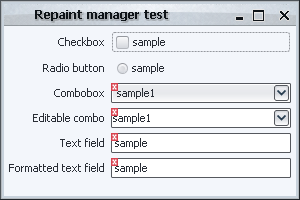
Validation overlay, repaint manager first try

Let’s try and play with it a little. Clicking on the editable combobox reveals the first problem:
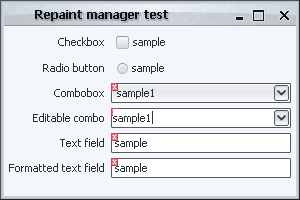
Validation overlay, repaint manager first try - problem

What happened? As i already mentioned in the groundworks entry, an editable combobox is actually a container that has a text field and a button. Swing is clever enough to understand that it needs to repaint only the textbox when it’s clicked, but not clever enough to see that the textbox is an integral (and internal) part of another component (our combobox). Thus, our first implementation actually never gets to paint the icon on the combobox, since it only sees the request to repaint the textbox. Note that this can be addressed by changing our application validation logic to handle the textbox-in-combobox explicitly. However, this introduces unnecessary coupling of the application logic with the internal look-and-feel specific implementation of an editable combobox (which may very across different LAFs).

Our second try will take this into account. The addDirtyRegion() of ValidationRepaintManagerSecondTry checks whether the component is a text field, and if it is, whether it lies inside a combobox or a spinner (note that here we assume that the current LAF uses text fields for editable comboboxes as well). If the conditions above are satisfied, we call the same method, but passing the parent container (combobox or spinner). The end result is that during the paintDirtyRegions() we will repaint the actual application component, and not one of its implementation children. Is this enough? It is for the first scenario (clicking inside a combobox). Let’s try something else – click on the button of the first combobox:
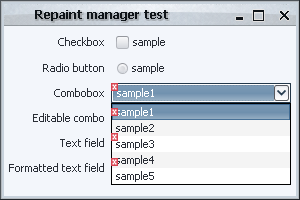
Validation overlay, repaint manager second try - problem

What happened here? The popup of the combo fits inside the frame bounds. In this case, Swing uses a lightweight popup implementation which just creates an additional layer on the frame root pane. However, our implementation of the paintDirtyRegions() first calls the super implementation (which paints all the components, including the popup layer), and then paints the error icons on all components that intersect with the dirty region. The end result is that the error icons are painted incorrectly on top of the popup.

Can this be addressed? It can, and ValidationRepaintManagerThirdTry paints the error icons after clipping out the areas of all the application popups (collected from the entire component hierarchy). The implementation details for such a simple functionality as validation overlays start to pile up rather unnecessarily. One of the main reasons is that we’re operating on a much higher level than we should be doing. While tweaking the dirty region for showing validation overlays is most certainly necessarily (and will, in fact, be used for a few other techniques), the actual painting process is very clumsy and inflexible. At this point, you can still end up with a few other visual artifacts playing with the lightweight / heavyweight popups and minimizing / restoring the frame. Here is one of them (note that the text fields don’t have error icons) – this happened after playing with the popups a few times:
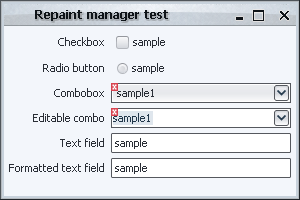
Validation overlay, repaint manager third try - problem

One of the reasons for such behavior could be the optimizations done in the top-level double-buffering support, another could be in the specific implementation of the lightweight and heavyweight popup windows in the JDK itself and the look-and-feel you’re doing.

As you can see, there is a good reason why the available third-party repaint managers only handle the computations of the dirty regions, leaving the actual repainting to the component level itself. In the next sections, we’ll see how this can be achieved, and what are the potential problems along the way.
I’m very happy to report that NetBeans developers have unrolled the changes that broke the Substance NetBeans module (reported in early May on NetBeans bug tracker). And so, if you’re using the daily builds of NetBeans 6.0 (after July 26th), you can install the latest development drop of Substance 4.0 module (code-named Key Largo).

Many thanks to NetBeans team and Standa Aubrecht in particular for listening to the community and making these changes that allow third-party look-and-feels to provide modules for both NetBeans IDE itself and NetBeans RCP programs. Standa was courteous enough to provide a patch that removes usage of deprecated APIs and unnecessary functionality. The only minor defect that will be fixed in the consistent appearance for tab scroll buttons.

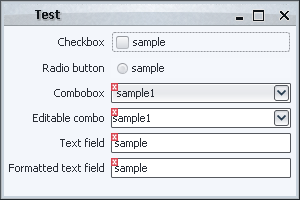
Before i start discussing the different implementations of validation overlays that illustrate the power and flexibility of the Swing rendering pipeline, i want to mention some of the common classes that will be used throughout this series. First, here is the screenshot of the sample UI that will be used for all the techniques:

Validation overlays groundworks

Note that the code focuses on the painting itself, and leaves the custom validation logic (based on the contents of the text field, selected combobox entry etc) to the application code (which is not relevant for discussing the Swing painting pipeline). The common classes are located in the <a href="https://pushingpixels.dev.java.net/source/browse/pushingpixels/src/org/pushingpixels/validation/">org.pushingpixels.validation</a> and <a href="https://pushingpixels.dev.java.net/source/browse/pushingpixels/src/org/pushingpixels/validation/common/">org.pushingpixels.validation.common</a> packages that contain the following:

  1. The SampleUi class is the UI itself. It uses the FormLayout to create a simple two-column layout with a few controls.
  2. The common.ValidationUtils provides a very simple implementation of two helper methods. The first is hasError(Component c) that returns boolean indication whether the specified component should show the error overlay. The second is the paintErrorIcon(Component c, Graphics g, int x, int y) that paints small error icon at the specified location. More on these two methods below.
  3. The ComponentVisitor interface follows the usual visitor pattern to allow some of the discussed implementations to visit all components starting from a specific root.
  4. The Visitor class implements the visitor pattern itself, with the static void visit(ComponentVisitor visitor, Component c, Graphics g) method that recursively visits the entire hierarchy of the specified component, calling the custom visitor logic on each one of the children components.

Note that the first two would be application-specific, and the last two are relevant only for some techniques.

In addition, using the visitor pattern reveals one of the weaker sides of Swing. The basic JComponent class extends Container, which means that every core Swing component can have children components. While it allows some nifty tricks like putting a JOGL-powered icon on a button, it unnecessarily exposes the application code to the implementation details of some more complex components. For example, an editable JComboBox is implemented with a text field and a button. A JSpinner is implemented as a text field and two buttons. Unfortunately, these are counted in the getComponentCount() and returned in getComponent(int index), which makes it rather annoying for the visitor pattern.

Subsequently, the sample implementation of the hasError(Component c) method in common.ValidationUtils makes special checks when it is passed a text field. If the text field has either combobox or spinner parent, it is ignored.

The next entry will show the first extension point in the Swing rendering pipeline – the repaint manager.

In my presentation at OSCON 2007 (PDF slides available) i talked about the Swing painting pipeline and how easy it is to extend it to provide custom painting behavior and effects. In this series i’m going to talk about these extension points in a more detailed way, taking you on a journey along a very well-engineered and extensible implementation that makes Swing one of the best available UI toolkits.

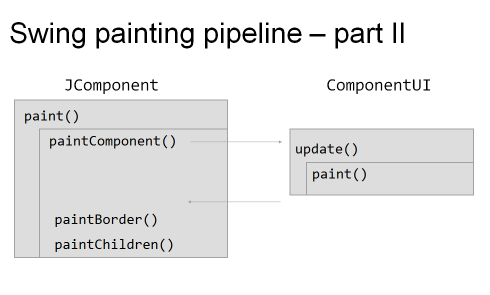
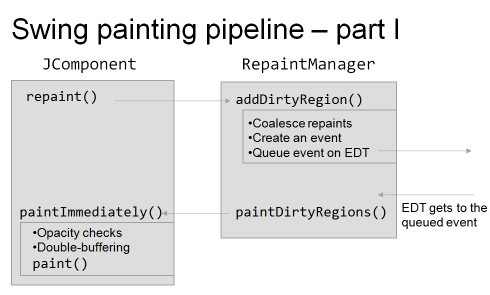
The following two images show a high-level overview of the Swing painting pipeline which consists of three major players, the JComponent, the RepaintManager and the ComponentUI:

Swing painting pipeline 1

Swing painting pipeline 2

As i mentioned in the presentation, pretty much everything you see in this pipeline is extensible, which makes it very easy to override / extend the basic core implementation and to provide your own custom painting. These extension points (or hooks) vary in three main areas: flexibility, robustness and ease of use.

By flexibility i mean the degree of control exposed by the specific hook. For example, if you want to add drop shadows to all your labels, it’s very easy to do with the UI delegates, but next to impossible with other techniques (such as glass pane, for example, especially for anti-aliased texts). By robustness i mean how sure can you be that your custom code works as expected across different operating systems and JDK versions. In addition, this includes the “stability” itself of the custom logic. For example, the repaint manager is a singleton, and you can have two or more application modules fighting to install their own implementation. Finally, by ease of use i mean the complexity of the implementation itself. While the repaint manager is, in most cases, the hardest to implement, providing custom painting logic with glass pane or by overriding paintComponent might be considered the easiest.

The techniques will be discussed and compared using the following common task – provide validation indication on different controls. The validation indication itself will be painted as a small error icon in the top-left corner of the “invalid” component; in addition, any Swing component can be in the invalid state. The later includes, for example, simple text fields and editable comboboxes (which contain child components as the implementation detail).

The following techniques will be shown (links will be added as each technique is described):

  1. Repaint manager
  2. Overriding paint() manually
  3. Using AOP to override paint()
  4. Custom border
  5. Layered pane
  6. Glass pane
  7. JXLayer
  8. Extending look and feel
  9. Multiplex look and feel

See you in the next entries.