A03 is a third-party Swing look-and-feel developed by Davide Raccagni and available under BSD license. Today Davide has announced release 4.0 of A03, with the main emphasis on performance. One of the tools he used during the development cycle is the LightBeam testbed that aims to assist in performance analysis of look-and-feels, as well as rendering pipelines.
Here are the results for the different core and third-party look-and-feels, as measured on my machine (without hardware acceleration that makes some of the scenarios run by up to 40% faster) – lower numbers mean faster performance:
- 3039 Metal
- 3721 Windows
- 4004 Looks PlasticXP
- 4332 Nimbus
- 4665 Substance 5.1
- 4902 A03
- 4908 Synthetica Base
In addition to performance improvements, Davide has also worked with me over the last few weeks to provide support for Flamingo components. Not only does the A03 Flamingo plugin provide fine-tuned visuals to some of Flamingo’s components, it also allows A03-powered JRibbonFrames to host the application menu button, taskbar panel and contextual task groups on the title pane under decorated mode. In doing so, A03 has joined Substance in providing streamlined visuals for the interested applications.
Below you can find a few screenshots of JRibbon and JRibbonFrame under A03 – click to see the full-sized versions.
The first screenshot shows the default content of the test ribbon shipped with Flamingo:

The next screenshot shows the activated application menu button:

The next screenshot shows the rich popup panel associated with a command button:

The next screenshot shows the extended tooltip associated with a command button in the taskbar panel:

The last screenshot shows the contextual task group headers:

Davide – congratulations on the release, and thanks for providing feedback on the extensibility points of the core Flamingo UI delegates.
There’s nothing like the right link at the right time. Remy Rakic (Twitter alias lqd) has left a link to the apparent release jars of JavaFX Desktop 1.0 in the comments on the previous entry. So i’ve decided to see whether there is anything new in the JMC department since the last time i’ve looked at it.
In the JavaFX preview, the native code was shipped directly in the jmc.dll. The download folder has the native libraries available in three platform-specific jar files (one for Windows, Mac OS X and Linux each). For Windows, the jar contains four DLLs:
- jmc.dll as before
- on2_decoder.dll which would be presumably responsible for the new licensed decoders
- msvcp71.dll and msvcr71.dll which are parts of Visual C++ 7.1
Assuming that this download folder is going to be used as a centralized WebStart repository, i would venture to say that there is going to be some kind of built-in mechanism for extracting these DLLs at runtime and updating the java library path. However, in my experiments i had to extract them manually and point the -Djava.library.path to the folder that contains those DLLs. We’ll wait and see whether the final (and official) release will follow in the footsteps of SWT 3.3 that handles the locally run extraction automatically.
Apart from the new JMediaView class that is a lightweight Swing component I haven’t seen any new classes. However, this JMC drop can play all QuickTime content from the sample page, including H.264, MPEG-4, 3GPP and MPEG-2, as well as the full scale trailers from the Apple site (in H.264 format). The playback support goes a long way towards my number one wish for desktop Java in 2008, and it will be hopefully followed by the recording capabilities as well.
I’ve decided to dive a little bit deeper into the JMC internals and updated the JMCFrame class to show a skeleton implementation of a “home-grown” player. Instead of using ready-made classes such as JMediaPlayer, JMediaPane or JMediaView, i’m creating a MediaProvider from the specific URI and attaching a VideoRendererListener to its VideoRenderControl (i would guess that the JMedia* classes follow the same route, but without the source code it’s hard to tell). This certainly makes the code a little bit more complicated, but allows much greater flexibility as far as compositing and overlaying go. Here is a screenshot of the player in action:
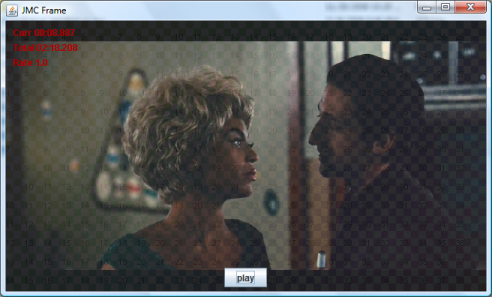
What do you see in the screenshot? There is a JPanel with a JButton control in it. The JPanel overrides the paintComponent and paints the following three layers:
- Gradient checkered background.
- The contents of the current video frame with 80% opacity.
- Information on the current media location, total duration and rate.
Using a MediaProvider with a VideoRendererListener allows some interesting things – overlaying translucent controls and HUDs, cross fading between multiple video streams and rendering video streams on arbitrary Swing components.
The new implementation supports dropping two kinds of video content:
If you run the sample code locally, drag a local video file on the panel and press the play button. The content should start playing. You can also drag a URL from your favourite browser. If that URL points to a video stream, the stream will be played – tested on streaming H.264 movie trailers from the Apple site :)
If i had to choose a particularly nifty API, that would be the MediaControl in the com.sun.media.jmc.control package. To get the specific control, call MediaProvider.getControl passing the class instance of the required control (such as VideoRenderControl). The MediaProvider.getControls API will enumerate the supported controls. Here is what i see on my machine when playing video files: play, audio, video, subtitle, video render and track. Hopefully we are going to see the record control joining this group soon.
Here are some Swing links that you might have missed during the last week:
- Jeremy Wood has been a busy blogger this week. First, he compares different approaches in using spinners for specifying length measurements in different units. Next, he presents a dialog to layout several tiles / cells on a print page. And finally, he closes the week with a partial implementation of Mac “Windows” menu that tracks the list of currently open top-level windows and their respective states.
- Olivier Gout has a prototype of WYSIWYG theme designer for Nimbus. The “official” Nimbus designer promised at this year’s JavaOne is nowhere in sight, and only time will tell whether this new attempt will outlive the growing list of Synth designers / builders mentioned in Swing Links of the Week edition of March 23, 2008.
- Patrick Ahlbrecht has a skeleton implementation of persisting window geometry and toolbar location between successive launches of an application window.
- Kai Toedter has written a demo application that shows how to use OSGi Declarative Services (DS) and Spring Dynamic Modules (Spring DM) together with Swing UI (and the Swing Application Framework, JSR 296). The Person Manager project is licensed under EPL.
- William Chen has announced his work on the Visual Swing Designer for Eclipse.
- Adam Bien continues to favor Swing over SWT in his two-part attack. Starting with how to make your Swing coding more efficient, he then continues to address the perceived Swing weak spots. From reading these and previous postings, looks like Adam holds a particular dislike towards SWT tables, and i couldn’t disagree more. Just like it takes quite some time to fully understand your way around Swing tables (including models, renderers, editors, listeners and much more), it takes a little bit more than a few suggested hours to switch to the SWT / JFace approach. This is not to say that one is clearly better than the other. It’s just that if you come with prejudice or a very strong knowledge in one, the other will seem clunky, over engineered and convoluted.
- Two interesting Swing-related threads on the Google group for Javaposse. The first addresses the misunderstanding of the painters issue and the community handling throughout the entire process, and the second calls for community questions on JavaFX.
- Andres Almiray has announced release 2.0.1 of JIDE Builder and 0.1 beta release of GfxPad.
- Roman Kennke continues his work with Java2D, writing about first Java2D pipeline implementation on top of the DirectFB hardware abstraction layer.
- Ken Orr has announced release 0.9.3 of Mac Widgets for Java. Major new addition in this release – iApp style scroll bars. Is it me, or is the reflection of the new scroll bars incorrectly flipped?
- Clemens Eisserer reports that his XRender pipeline has been integrated into the IcedTea fully open sourced port of OpenJDK.
In three days, JavaFX Desktop 1.0 will be officially released. I have been skeptical about JavaFX over the last few months, and while this may be attributed to general inclination of programmers towards being “entrenched” in the technologies that they know, there are other reasons as well. Aside from a few unnamed technology partners that were participating in shaping the capabilities of this release, the community has been effectively shut from lending its hand in commenting, testing and evolving the platform. We have long heard about “being blown away” by the new functionality being brought by JavaFX to the RIA market, and this week we will finally see if it is going to live up to the marketing hype.
Personally, i will be very glad to see at least one out of the following ten items being available for JavaFX, as well as cross-platform Swing applications come December 4:
- 6u10 / 6u11 for Apple – [update] see bug 6761033 for some interesting news.
- Full java lightweight rendering of SWF files even without installed Flash engine
- Full java lightweight rendering of H.264 files even without installed codecs
- Adaptive video streaming based on the client CPU and network utilization
- Video capture and creation
- Fully skinnable lightweight browser component based on WebKit or Mozilla / Gecko
- Inclusion of form-oriented layout manager
- Support for high level shader language (HLSL) for hardware accelerated custom effects
- Nimbus designer
- JavaFX.com with JavaFX-only applet driven content
And is it me, or are we going to see Sun ditching its own module initiative and move towards restructuring JDK as a collection of OSGI bundles?
The latest addition in the Flamingo component suite is support for minimizing the ribbon. This has been one of the items on the roadmap for version 4.0 (code named Fainnear), and is now available in the latest 4.0dev drop of Flamingo core and 5.1dev drop of Substance Flamingo plugin.
There are three ways to minimize and un-minimize the ribbon:
- Application code can use the new JRibbon.setMinimized API
- User double-clicking a task toggle button
- User pressing Ctrl+F1 key stroke
Here is a screenshot of a ribbon when it is not minimized:

When the ribbon is minimized in one of the three ways mentioned above, only the task bar and the task toggle button bar are shown. The ribbon bands of the currently selected ribbon task are hidden. Note how the main content of the frame (delineated with the Word-style ruler bands) gets expanded to occupy the area of the ribbon bands:

When a task toggle button is single-clicked, the ribbon bands of the clicked task are shown in a popup overlay without shifting the main content area down:

The ribbon tasks in the popup overlay have the same cascading popup support as the usual (non-minimized) ribbon tasks. Here is a extended popup menu of a Popup button from the first ribbon task:

If you want to see the scrolling in action under the core look-and-feels, run the following WebStart demo:

If you want to see this functionality under Substance, run the following WebStart demo:

If you want to test the new functionality in your applications, you would need the following (the last two only for applications running under Substance look-and-feel):
Your feedback is, as always, greatly appreciated.


