Here are some Swing links that you might have missed during this week:

  • Geoffrey Wiseman shares an interesting tip on hiding a UI during the test running. In order to get the UI tests running on the continuous integration server, they needed to find a way to run in headless environment. While it appears that the solution works only on X server, it opens an intriguing array of possibilities which hopefully can be implemented in a cross-platform way in a general purpose UI test library such as Fest (by Alex Ruiz and Yvonne Wang Price). This would be useful in areas beyond testing. For example, most of the documentation screenshots for Substance (that show various themes, watermarks and skins applied to the same UI) are taken by a Robot-controled process. During this process (which takes a few minutes) i have to make sure that i don’t accidentally interact with the frames and dialogs that get captured so as not to interfere with the correct visuals. Can this process can be done in a headless mode with an approach similar to what Geoffrey is describing?
  • Davide Raccagni announced release 2.0 of his A03 look-and-feel (link a little slow to open because of embedded videos). A major change is that A03 now can run under JDK 5.0 (unlike the previous releases). In addition, it features a theming layer and has a few interesting visuals (such as decorated title pane gradients, progress bar fill pattern, rotated tabs on left and right placement and some others). Personally, i’m very happy to see that some code in A03 is based on the code from Substance (which is, in turn, based on some code from Looks, Quaqua and Xoetrope).
  • Elliott Hughes shares his frustration with the JTextPane implementation when it shows an HTML document. Starting from trying to prevent beeps on setText() API, he quickly gets into one of the biggest gaps in Swing as a modern UI toolkit (not mentioned in my previous rant) – support for HTML 4.0. Hasn’t it been eight years since it was finalized?

Java desktop wishlist for 2008

October 26th, 2007

While the Java blogosphere is raging with debates on closures, properties and other negligible language-level features, the client-side battle is still fought between Microsoft, Adobe and Apple. And while finally Sun decided to step in with JavaFX and improved applet handling, this will change little without the tools for content handling.

As i already said, the customers don’t care about the technology. In “The Agnostic Geek“, Brandon Carson writes:

when you look at a web page, do you think, “Gee, I wonder if they coded this in BBEdit or Dreamweaver?” I don’t know about you, but I don’t give a flip what software product is used to create a web page. Use TextEdit for all I care.

And so, who cares that the applets will load instantly when there are so few good applets? Just look at the amazing breadth of Flash content created by professional designers. Content that has rich multimedia capabilities. Capabilities that come built in with the platform. Platform that is oriented towards content.

So, what are my top two wishes for Java desktop for 2008?

Number one: Cross-platform support for H.264 and FLV formats.

Showing is good, but it also must support creating the content and editing the content (just look at the Sliverlight demoes). And don’t tell me that 99.9% of the market doesn’t need editing. If you want to lead the market, you have to cover everything that the competition has and then some.

I don’t know about the licensing issues, but the reference implementation for H.264 is not that big. And Onavia already has pure-Java player. So it can’t be that hard once you decide to put as many resources on that as you do on JavaFX. And even better, accelerate it with OpenGL and Direct3D, while at the same time gracefully degrading to software loops on older cards.

Number two: Converters and viewers for competing markup formats.

You know what i’m talking about – those pesky competitors that have 99.9% percent of the consumer-facing rich desktop market. Flash / SWF, Flex / MXML and WPF / XAML. Each has its own set of designer tools for creating rich content. Each has armies of professional designers versatile in using those tools, in addition to Photoshop, Maya and others. Do you really expect them to master yet another (unproven) designer tool?

If JavaFX wants to have a fighting chance, it needs to provide a simple migration path. A path that allows taking an existing Flex / Silverlight application and importing it to JavaFX (at least the visuals). XAML has at least three – converter from Maya, converter from Photoshop and converter from SWF. The importing is not enough. You have to have exporting as well. If you’re not convinced, read what Joel Spolsky says about how Excel managed to overpower Lotus:

And this reminded me of Excel’s tipping point, which happened around the time of Excel 4.0. And the biggest reason was that Excel 4.0 was the first version of Excel that could write Lotus spreadsheets transparently.


Yep, you heard me. Write. Not read. It turns out that what was stopping people from switching to Excel was that everybody else they worked with was still using Lotus 123. They didn’t want a product that would create spreadsheets that nobody else could read: a classic Chicken and Egg problem. When you’re the lone Excel fan in a company where everyone else is using 123, even if you love Excel, you can’t switch until you can participate in the 123 ecology.

If you want to have professional designers to switch to JavaFX, provide a clear path back. Not that they’ll take it (of course, if the tools and the runtime are bad, they will), but it will give them a nice sense of security.

An extra step would be to allow using the same exact content at runtime without converting it to JavaFX. Soyatec does it partially for XAML, so it can be done. But if you do it, support the complete feature set (including 3D and, guess what, rich multimedia). A bonus part would be to include a bitmap to SVG converter – see VectorMagic for inspiration.

That’s it. I have only two wishes. Granted, these are two big hefty wishes. Will they come true? The first one might partially be, and the second one is highly unlikely.

A slew of postings over the past day (see Mark Finkle, Myk Melez and Alex Faaborg) announce a new experimental project from Mozilla Labs – Mozilla Prism. Following in the footsteps of Adobe (AIR) and Microsoft (Silverlight), it blurs the lines between web applications and desktop applications. However, a distinct advantage of browser development team allows Prism to have a simpler paradigm.

What it basically does (you can ignore all the mockup screenshots) is having a chromeless browser with a desktop shortcut. Nothing more and nothing less. You get a shortcut on the desktop that is configured with the specific URL. When you activate the shortcut, it opens that page in a browser that has only the the rendering canvas (with optional address bar and status bar). As simple as that, and nothing that you could not have achieved up until now with a few manual steps.

Here are a few screenshots of the process. First, download the prototype (available for Windows only). After installing, run the Prism. It shows the dialog for configuring your Prism application:
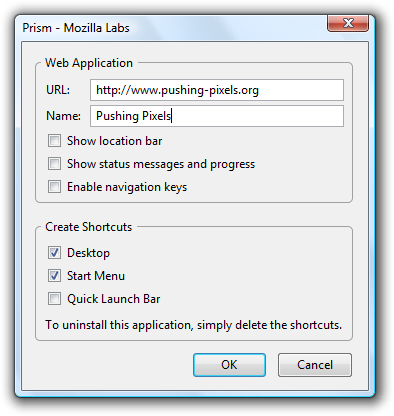
Prism setup

Clicking OK creates the relevant shortcuts. When you activate the shortcut, you get the corresponding site shown in its own chromeless Firefox (which does not have any Firefox branding) – click to see fullsize:
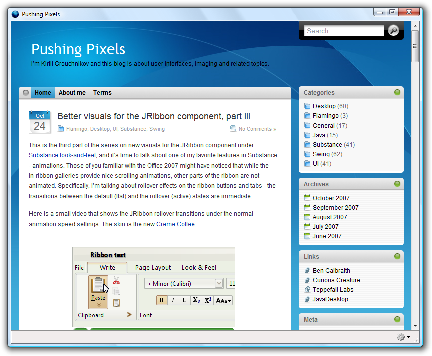
Prism thumbnail

This is the third part of the series on new visuals for the JRibbon component under Substance look-and-feel, and it’s time to talk about one of my favorite features in Substance – animations. Those of you familiar with the Office 2007 might have noticed that while the in-ribbon galleries provide nice scrolling animations, other parts of the ribbon are not animated. Specifically, i’m talking about rollover effects on the ribbon buttons and tabs – the transitions between the default (flat) and the rollover (active) states are immediate.

Here is a small video that shows the JRibbon rollover transitions under the normal animation speed settings. The skin is the new Creme Coffee:


And here is a video of the same rollover transitions under the Office Blue 2007 skin:

Want to take it for a spin? You’ll need the latest binaries of Substance, Flamingo and Substance Flamingo plugin.