Every once in a while (and lately, more and more often, as can be seen here, here and here) you see blog entries saying that the best developers are severely underpaid. You start reading through these entries, and they say that the difference between the best and the worst programmers is anywhere between 5 to 28 times. An implicit conclusion is left to the reader – why aren’t the best programmers getting 5 to 28 times as much money than the worst programmers?
I can’t help but think that these entries are very popular because of the Dunning-Kruger syndrome which postulates that a person with little knowledge isn’t aware of how little does he know. If this is true, that would mean that every (yes, every) reader of such an article will see himself in that “best” position. The position where he should be earning 5 to 28 times as much as he is earning now (the higher the number, the better the feeling should be).
But let’s look at it from another perspective. Instead of paying you (as “the best”) five times as much as you’re currently making, let’s pay the others (as “the worst”) a fifth of what they’re making now. Suddenly, all the “others” are gone (the average salary in our field is still much higher than the average in many other professions, but not as high as that). What does it mean to you? That you will be doing all the other stuff that was previously was done by the “others”. If you were truly the “best”, most chances are that previously your boss tried to give you better (more interesting, more challenging, more rewarding) tasks. Of course, every once in a while you get stuck with boring and repetitive stuff (especially if it’s your first position), but if you’re really the “best”, you will get better tasks. But not when the “others” are gone…
So, if you don’t like your current place, start looking elsewhere. If somebody is interested in you, and you’re interested in them, make the move. If nobody is interested in you, take a hint. And be happy that programming is still one of the rarest areas where you can have a very satisfying job that pays well.
Swing APIs are very powerful. And very flexible. You can do pretty much anything you want to with Swing (depending on how much time you have). But this flexibility leads to a very high level of confusion for Swing beginners. Mainly, it’s because there are so many ways to (seemingly) accomplish the same task, that in most cases a beginner Swing programmer will choose a wrong one. Which may result in random UI locks, temporary freezes, solutions that don’t work across different platforms, various visual artifacts and many more. Who will be the first to blame? Of course, the platform itself. And so Swing carries with it the legacy of being slow, over-complicated and hard to master.
And here is a simple example. Out of 435 methods on JButton, there are setContentAreaFilled and setBorderPainted (apparently going back as far as JDK 1.3). What’s the purpose of these two? To enable and disable the painting of the button’s content area (fill) and the border, respectively. Flexible? Very. Want to have a button that shows the border but has no fill? No problemo. Want to have a button that has a fill but no border? Muy bueno. Want to have a button that has none? Por favor, senor.
There are two problems with this flexibility. The first is that these two APIs don’t really map to the real UI scenarios. The second is that they can not be faithfully supported across different look and feels (which eventually do the painting). Let’s look at these two more closely.
Personally, i don’t recollect seeing a native application which has a button with a border and no fill. Or a button with a fill but no border. Especially with modern OSes that provide intricate gradients on the content area. It just wouldn’t look right. Not under XP, not under Vista and not under OS X. What you really want to do is to provide flat appearance. This is especially true for toolbar buttons. Most modern applications use flat toolbar buttons – a button that shows the background (fill + border) only when it’s active. It can be rolled over, pressed or selected, and only then it will show the background. When it’s in a default state, it doesn’t show the background. In this case, you could call both the APIs together (setting content area fill and border painting to false), but it doesn’t really provide a correct visual solution, since the button will be painted flat even when it’s active. Not to mention the fade animation that brings the button from flat (default) to full (active) state.
And what about the actual support for these two boolean settings. Unless you override paint or paintComponent, everything is painted by the current look and feel. And some look and feels simply can not provide support for these settings. The following screenshot shows two buttons under JDK 6.0 running on Vista. The first button has content area fill set to false (but the border painting set to true). The second button has border painting set to false (but the content area fill set to true).
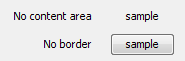
As you can see, the visual result is not quite what the application code intended. Why is that? Because the Windows LAF is implemented with calls to native OS APIs, and these do not provide this distinction (and why should they, what’s the purpose of a button with a fill but no border, especially when the fill is a complex gradient?)
The same logic would apply to other modern look and feels, most of which employ complex gradient interaction between the inner fill and the border painting. And once again, why would you want a button with one, but not the other?
Do i have a solution? Not one which would be adopted in JDK, that’s for sure. If it were up to me, i would remove these two methods, and replace them by setFlat and setNoBackground. The two would provide the same appearance for default state (combining both existing APIs into one), with the first providing an extra visual sequence of fades (between default and active states) and painting the background on active state. Why it won’t be adopted? Because JDK never removes APIs, it only deprecates them (which essentially amounts to nothing). And adding extra two methods would only make things more complicated for beginner developers.
A partial solution is provided in Substance in the form of two client properties, FLAT_PROPERTY and BUTTON_PAINT_NEVER_PROPERTY. It’s far from optimal, of course, since the existing APIs are still available (and supported), and these client properties are Substance-specific (which might be perceived by the potential users as lock-in).
I’m always excited to see an announcement of a new look and feel (or even a new skin in an existing look and feel). Writing such a library is quite a complicated task that requires a lot of resources and perseverance. And so, it is my great pleasure to see two new third-party look and feels announced in the last couple of days.
The first is A03 and comes from Davide Raccagni. Very nice and polished visuals, a lot of smooth animations and transitions, and even the initial theming support. It has a few interesting ideas that i would like to incorporate into future versions of Substance, such as “flowing” menus and extended file chooser. The license is very permissive (BSD), and the only thing that might hinder its acceptance is the minimum JDK requirement – JDK 6.0.
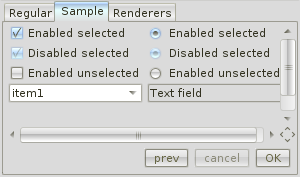
The second is Titanium and comes from Teppefall Labs. It extends one of the dark skins from Substance and provides a modern-looking, clean and consistent skin for desktop applications. My original intent was to make Substance as extensible as possible, and this is the first time i am aware of a third-party look and feel that extends it. Hopefully, most of the extension hooks are already in place, and if not, they will be.
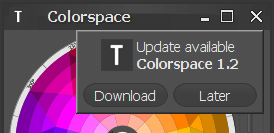
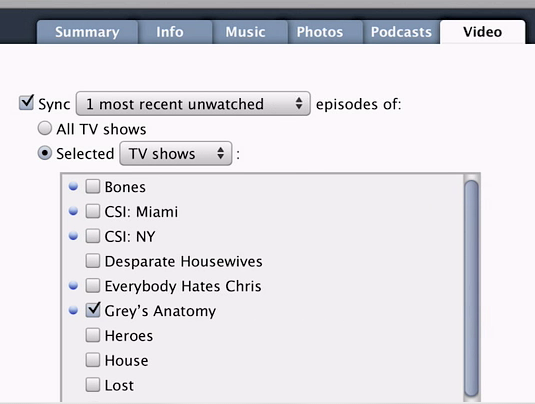
Judging by the applications coming lately from Apple (such as native controls in Safari on Apple and iPhone), Aqua is as good as dead. Here are two screenshots from the latest iTunes (taken from the activation guide just posted on Apple site). Click to see full-size images.
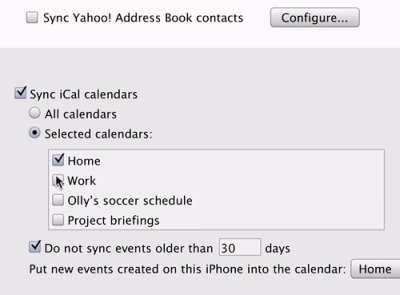
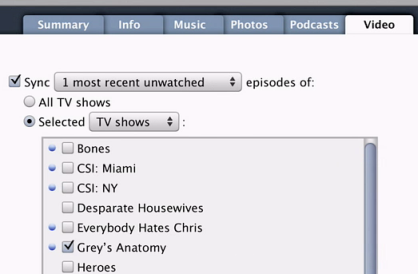
Does this mean that the system look and feel will no longer be apple.laf.AquaLookAndFeel? Will it go back to com.apple.mrj.swing.MacLookAndFeel? Or maybe Apple JDK 6.0 will have a brand new class with a brand new name? Or maybe Apple will choose the same route as Sun did with JDK 5.0 and extend AquaLookAndFeel with a new theme (re: Metal / Ocean)?
By the way, is this the new look for tabs?