I’ve started playing with custom alpha channel settings for certain component states. Look at the following screenshot:
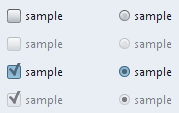
The checkbox and the radio button on the second line are disabled. The checkbox and the radio button on the last line are selected and disabled. As you can see, in general, you would use three color schemes for three major component states: active (selected, rolled over, pressed), default and disabled. In most cases, the disabled color scheme uses the same color values as the default color schemes, but the overall colors are a little brighter. So, i was toying with the idea of using the same color scheme for both default and disabled states, but set arbitrary alpha for the disabled state.
The implementation is a little complicated (especially since there are so many core components), and this is what has been taking my time lately (with no posts on Substance in the past few days). And just when i thought it was progressing smoothly, i hit this:
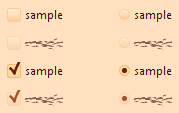
It took almost two hours to isolate this problem to a small and complete test application which i posted at the Java2D forum over at java.net. So, don’t be surprised to see a few garbled strings if you’re running under the latest 4.0dev drops of Substance and using the experimental Autumn and Magma skins. I think that i’ll be able to find a workaround for this bug(?), but i’ll wait to see the replies on the forum linked above.
Update: Phil Race from Sun’s Java2D team has confirmed this bug and provided a workaround. See the thread at Java2D forum for the suggested workaround (confirmed to work on Vista). Thanks, Phil.
The marketing / evangelizing teams of NetBeans are very quick to respond to any obscure feature reportedly missing from the latest milestone drops of NetBeans 6.0, which usually involve arcane keystrokes requiring two or more hands at the same time. Every once in a while (about once every two-three months) I honestly try to switch to NetBeans for my home development (at work it’s not an option since some of our tools are developed as Eclipse plugins).
One of the best posts on “Joel on Software” described Microsoft’s strategy to compete against the(n) market leader in spreadsheets – Lotus. According to Joel, the tipping point was the introduction of “easy switch” feature into Excel. Not only you were easily able to import an existing Lotus spreadsheet, it was extremely easy to export your Excel back into Lotus. This gave people a sense of security in trying out the new product – if i’m not satisfied, i can always switch back to the environment i already know. And since Excel came packed up with a lot of advanced functionality, people actually never switched back.
Fast forward to NetBeans vs. Eclipse / IDEA / JDeveloper competition. It seems that the evangelists are focusing on the wrong angle. Showing me how to do something in NetBeans when i know how to do this in Eclipse (especially when i know most of the shortcuts by heart) won’t make me switch to NetBeans. What you can do is to let me point to my existing project and not fight me along the way when i want to run it. What do i mean?
One of the main selling points of NetBeans is that it’s Ant-centric (whatever that means). So what happens when i want to import an existing project? NetBeans provides an option to have it as a “freeform” (or something like that) project, which doesn’t allow right-clicking on a class and running it. I have tons of test applications that i need to run, and under NetBeans i can’t run them if i don’t create a new project. And if i create a new project, i’m stuck with tons of ugly and NetBeans-specific Ant tasks that use custom namespaces and what not.
I don’t want that. I don’t want the IDE to fight me. Not when it wants to win my developer heart. I’m OK with Eclipse. Maybe i’m missing a lot by not switching to NetBeans, but the initial barrier for existing projects it too high for me. I want a project that is portable across IDEs. I want a project that my users can check out from CVS and build from the scratch when all they have is a JDK. And that they can do it when the Internet connection is down. I want (at least a false) sense of security that i can always go back to Eclipse. At the present stage (tried 5.0, 5.5 and various milestones of 6.0) i don’t have it.
Time and time again i reach the same conclusion – having bugs is good (if not great) for your project. And before i start explaining the reasons why, you’re welcome to read Joshua Bloch talking about why we will all have them (even if you’re “the best” and not “the worst”):
We programmers need all the help we can get, and we should never assume otherwise. Careful design is great. Testing is great. Formal methods are great. Code reviews are great. Static analysis is great. But none of these things alone are sufficient to eliminate bugs: They will always be with us.
So, let’s start:
- It shows that you’re human. We all make mistakes, and it’s only human to deny that. But if you just make an extra effort to acknowledge this and listen to those who know better, you project will benefit greatly.
- It opens the dialog with your users. If you’re quick to fix it, you will have established a great relationship with the user that reported that bug. He will see that his time in reporting the bug was not spent in vain. The faster you do this, the better for you, your users and your project.
- There is no such thing as bad bug. You might not like the core APIs, but people are using them. Adding documentation might be annoying, but if your users get lost, they will blame you and choose some other library. And every once in a while you will learn a thing or two from your users.
- It shows that people are interested in your project. Not only that person downloaded and used your code, he also went an extra mile in writing you a mail and describing the problem. To ignore this is at least insulting to that person. The same applies to accepting bugs only through the project tracker. If people choose to write personal e-mail, respect that.
- Fixing a bug can (and will) establish professional relations with other developers. You might (and will) get preferential treatment when you find bugs in their libraries that you’re using. Your request to add new features might (and will) get preferential treatment as well. But don’t expect that people will recognize you when you go to the neighborhood grocery store.
I could go on and on, but you get the idea. And last, but not the least – i am proud to say that there hasn’t been a single piece of code that i ever wrote that didn’t (or doesn’t) have a bug. If anybody (including myself) tells you different, he’s a liar.
Over the past two+ years that i’m developing Substance, i’ve seen my share of the lengths the programmers go to bend Swing APIs to their will. The very nature of a look and feel library in most cases prevents me from asking my users to fix their code, since such a library is supposed to be a simple drop-in. So, this is just a small sample of the application quirks that found their way into Substance codebase:
- A visible progress bar with zero bounds
- A combobox that switched “editable” mode depending on the selected index
- A toolbar embedded in a panel embedded in another toolbar
- A custom table renderer providing custom painting and ignoring the opacity setting
- A null tab in a tabbed pane to be filled only when it’s selected
- An application running with a boot classpath loader
- An OS-specific defect (WORA anyone?) Especially irritating if you don’t have access to such OS.
By the way, the next time you consider writing a look and feel, you’re welcome to start here.
