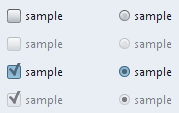
Animations are most probably one of the main ingredients of a modern UI. This applies not only to traditional (thick) rich clients, but also to the new (thin) web clients (at least judged by the amount of tutorials that show different animation, fading and sliding tricks using simple HTML and CSS coding). And Swing shouldn’t be left behind. This is why i started working on animations as a built-in layer in the Substance look-and-feel. It has started back in October 2005 with simple fades on buttons, continued with more advanced animations on tables, lists and trees and is still under significant development today (and in the near future).
I mentioned already that Swing has 41 different core components, and pretty much all of them are good targets for some kind of animations (if done in a consistent, non-invasive, non-distractive and configurable way). And so, the latest drop of 4.0dev (code-named Key Largo) provides even more advanced animations as before. In this series of postings i’ll show some of these animations in action. You’re more than welcome to try out the latest binary drops and post your feedback here, on project forums, mailing lists or in a private e-mail.
The first video below shows improved rollover animations on tables. Note that the animations have been extended to the table header as well, providing a consistent visual indication for the user (Business Black Steel skin is used):
The second video shows the improved selection animations on the tables. Not only the table headers are now animating in sync with the cell selection, but there’s a new animation on the focus ring on the currently focused cell. The focus ring is faded in and out along with the selection background, providing a streamlined and consistent animation effect (Business Black Steel skin is used):
The next video shows improved animations on the sliders. One of my previous entries showed the animations on slider thumbs. These has now been enhanced by fades on the selected portion of the slider track when the user hovers over the slider thumb (Office Silver 2007 skin is used):
The last video shows much improved animation implementation for menu bars and menu items. Note the smooth fade ins and fade outs using a custom state-aware theme on both the top-level menus and the menu items inside a menu (Office Silver 2007 skin is used):
Note that for illustration purposes, all the videos in this entry use slower animation speeds. Under the normal (default) setting, the animation sequences are faster and less distracting. Let me know your thoughts.
It has been added last October, but only now i feel that it has been polished enough to have it officially supported and released. The latest 4.0dev drop of Substance provides full support for a new toned-down skin named Autumn. It is similar to the Creme skin, but even less intrusive. It is one of the two new skins that use the same theme for default and disabled controls. In order to differentiate these two states, a skin defines a custom alpha value (translucency) for the disabled state. The end result (see screenshots below) is that the disabled controls appear less “visible” as the default controls. This also means that if you set a non-null watermark, it will “shine through” the disabled controls.
Here are a few screenshots of different controls under the new Autumn skin. Buttons, toggle buttons, checkboxes and radio buttons in different states (default, selected, disabled and disabled selected):
Comboboxes in different states (default, active, disabled, with custom background):
An internal frame with a few controls:
Horizontal and vertical sliders in different states (enabled, disabled, ticks, labels, RTL). Note the translucent layers on the disabled sliders:
Progress bars (horizontal, vertical, determinate, indeterminate, with caption):
Tree with a selected and rollover path:
A control panel with different controls embedded in a SwingX task pane:
SwingX error pane:
SwingX month view:
A frame with menubar, toolbar and status bar from SwingX:
You’re welcome to try this skin and report any issues / RFEs that you find.
I’ve started playing with custom alpha channel settings for certain component states. Look at the following screenshot:
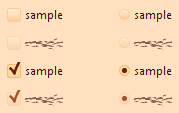
The checkbox and the radio button on the second line are disabled. The checkbox and the radio button on the last line are selected and disabled. As you can see, in general, you would use three color schemes for three major component states: active (selected, rolled over, pressed), default and disabled. In most cases, the disabled color scheme uses the same color values as the default color schemes, but the overall colors are a little brighter. So, i was toying with the idea of using the same color scheme for both default and disabled states, but set arbitrary alpha for the disabled state.
The implementation is a little complicated (especially since there are so many core components), and this is what has been taking my time lately (with no posts on Substance in the past few days). And just when i thought it was progressing smoothly, i hit this:
It took almost two hours to isolate this problem to a small and complete test application which i posted at the Java2D forum over at java.net. So, don’t be surprised to see a few garbled strings if you’re running under the latest 4.0dev drops of Substance and using the experimental Autumn and Magma skins. I think that i’ll be able to find a workaround for this bug(?), but i’ll wait to see the replies on the forum linked above.
Update: Phil Race from Sun’s Java2D team has confirmed this bug and provided a workaround. See the thread at Java2D forum for the suggested workaround (confirmed to work on Vista). Thanks, Phil.
Over the past two+ years that i’m developing Substance, i’ve seen my share of the lengths the programmers go to bend Swing APIs to their will. The very nature of a look and feel library in most cases prevents me from asking my users to fix their code, since such a library is supposed to be a simple drop-in. So, this is just a small sample of the application quirks that found their way into Substance codebase:
A visible progress bar with zero bounds
A combobox that switched “editable” mode depending on the selected index
A toolbar embedded in a panel embedded in another toolbar
A custom table renderer providing custom painting and ignoring the opacity setting
A null tab in a tabbed pane to be filled only when it’s selected
An application running with a boot classpath loader
An OS-specific defect (WORA anyone?) Especially irritating if you don’t have access to such OS.
By the way, the next time you consider writing a look and feel, you’re welcome to start here.