Following the comments from the previous entry that introduced a Swing breadcrumb bar component that allows browsing local and remote SVN repositories, the latest 2.1dev drop of Flamingo has the following new features:
- Kamil and Danno pointed out that the network-related tasks (such as connecting to an SVN repository and fetching folder contents) shouldn’t be done on the EDT. I guess this is what happens when one pays too much attention to pushing the pixels :) The latest drop uses the JDK 5.0-compliant version of
SwingWorker and offloads all relevant tasks off the EDT. The end result is that all breadcrumb bar core implementations (including the local file system browser) should be much more responsive and without any UI freezes.
- AC suggested that i should provide an adapter to
TreeModel interface. The org.jvnet.flamingo.bcb.core.BreadcrumbTreeAdapterSelector does just that, allowing wrapping an existing JTree or TreeModel with minimal additional application logic. The only additional logic you need to provide stems from my current reluctance to rely on the existing tree cell renderers, especially when a custom renderer doesn’t extend a JLabel. There are three constructors in this class, and you can look at test.bcb.JTreeAdapterBreadCrumbTest and test.bcb.TreeModelAdapterBreadCrumbTest to see how easy it is to wrap and adapt an existing tree or tree model.
- Eugene was confused by the proximity of the SVN repository selection combobox and the breadcrumb bar itself in the screenshots. This prompted me to write an experimental
org.jvnet.flamingo.bcb.core.BreadcrumbMultiSvnSelector class. Its root selector allows selecting an SVN repository, and all the other selectors browse through the selected repository. There have been some synchronization issues, since everything is done off EDT in separate SwingWorker tasks; these have been hopefully addressed. You can play with this component or the test.bcb.MultiSvnBreadCrumbTest test application and let me know if you run in some deadlocks / synchronization / inconsistency issues.
Thanks to everybody for your insightful comments. Hope you like the new version better. Here is the link to the WebStart SVN browser application once again (this time without hogging EDT):

For more thoughts from the original creator of Swing breadcrumb bar, Rick Jelliffe, click here.
Update based on the comments: the latest version of Flamingo has the following fixes
- Immediately showing selected element with ellipses (…) to indicate that the choices are loading
- Not showing the choices selector when there are no choices
- Fix on pressing the choices selector arrow when popup is showing
Thanks, Eugene and Matt for valuable feedback; it is much appreciated. You’re welcome to run the WebStart application and see if it behaves in a more user-friendly way.
Early last year, i wrote about an outside contribution to the Flamingo component suite. Back then, Rick Jelliffe of Topologi has graciously donated his Breadcrumb Bar component under the BSD license. You can see breadcrumb bars pretty much everywhere on the web, and Vista explorer uses it as the default representation of your current location in the folder tree:

Since then, i’ve made a few simplifications and improvements to the original code, and the BreadcrumbFileSelector component (now in org.jvnet.flamingo.bcb.core package) provides a Vista-like file navigator bar. In addition, the latest development drop of Flamingo 2.1dev (code-named Deirdre) contains an additional core breadcrumb bar implementation that allows navigating SVN repositories (local and remote).
The implementation itself is available in the BreadcrumbSvnSelector component (in the same package) and uses SVNKit, the pure Java Subversion client library. A sidenote before i proceed – the SVNKit license is copyleft, and if you want to use this component in your closed source, you will either have to buy a commercial SVNKit license, or replace the implementation of BreadcrumbSvnSelector.PathCallback with another SVN library.
Let me show you how simple it is to use this component. First, you can run the demo application that allows you browsing through three remote SVN repositories, SVNKit itself, KDE and Apache:
The initial screen is empty and has a combobox in the left part of the toolbar to select the SVN repository:

Once you select the repository, the application code calls the following method on the BreadcrumbSvnSelector component:
public void setConnectionParams(String url, String userName, String password)
The parameters are self-explanatory, with the first one being the repository URL (can start with svn://, http://, file://), and the last two specifying the authentication information. Once the connection has been established, the breadcrumb bar component will show the first path selector:

From this point, the component will fill the path choices on its own without any additional application code (unless you want to provide custom filtering or sorting). Nevertheless, the application needs to provide some code to react to the path change events on the breadcrumb bar. In order to do this, add a listener to the component by calling the following method:
public void addListener(BreadcrumbBarListener<String> lst)
In the listener, listen to BreadcrumbBarEvent.PATH_CHANGED event type, retrieve the path with the getNewValue() method of the event itself and provide application-specific logic. In the following screenshot, the right panel shows all files under the selected folder:

As i already mentioned, the application doesn’t need to provide any callback to fetch the subfolders of the selected folder – the default implementation does it automatically:

You can also switch the SVN repositories on the fly by calling the setConnectionParams method mentioned above. There is no need to reset the breadcrumb bar path state – the component does so automatically:

To view the complete source for this test application, click here. As you will see, most of the code deals with the layout and memory load / save functionality (another feature of breadcrumb bar that is detailed in the documentation). All the hard work of connecting and browsing the repositories is done by the component itself.
Continuing the series on the support for high-DPI monitors in Swing applications and having covered the big areas in the first two entries (alignment and borders), it’s time for miscellaneous stuff. There are quite a few less-defined areas that should be addressed by a look-and-feel that aims to provide complete high-DPI support. Let’s look at some of these.
The first one is linear elements, such as separators, titled borders and focus rings. Like the borders, these should be painted with a stroke width proportional to the default desktop font size and DPI settings (or the font size of the specific component). In addition to painting, these settings affect the preferred size and insets of the corresponding elements. Here is a screenshot of two titled borders under 22pt fonts:

In addition to titled borders, the look-and-feel should also scale such elements as focus ring stroke width, dash length and dash gap. This is illustrated in the next screenshot (second slider has the focus):

In this screenshot, you can also see an additional linear element – slider ticks. These are also scaled (length and thickness) with the font settings. Furthermore, the entire slider painting is scaled as well, including the track height, thumb icon, track border thickness and thumb icon thickness. All of these affect both the inner layout and the preferred size computations.
An additional area is cell renderers. There are quite a few of these on core Swing components, including lists, trees, tables and table headers. While some applications use custom renderers (which should be written to support high-DPI monitors), the look-and-feel is responsible for providing the default renderers. These should properly compute the insets and set the borders (for focus indication, for example). Here is a screenshot of a table under 22pt font:

As you can see, everything is scaled here, including the renderer insets, header renderer borders and table grid lines.
The areas mentioned in this entry are just a sample. There are many more, including vertical components (such as sliders and progress bars), menu items, right-to-left orientation.
All the screenshots in this entry have been taken under the latest 4.1dev drop of Substance (code-named Lima). It is scheduled to be released in mid-November, with a release candidate scheduled for late October. You’re more than welcome to download and play with the latest bits, as the development is going to move much slower towards the feature freeze in two weeks.
A mildly unexpected announcement on Jasper’s blog (a little earlier than hinted previously) that leads to this page on JDK 6.0 project unveils the first binary drop of Consumer JRE, or “Java SE 6 Update N” as it will be officially known. While the previous name was very catchy, the new name is very bland and generic (really, you couldn’t go with a letter more sexy than “N”?)
The naming aside, we finally get a chance to play with Nimbus. Surprisingly, the full class name is sun.swing.plaf.nimbus.NimbusLookAndFeel (why not in javax.swing?) There are a few visual glitches, as expected from early access drops. Here is a sample screenshot of an internal frame:
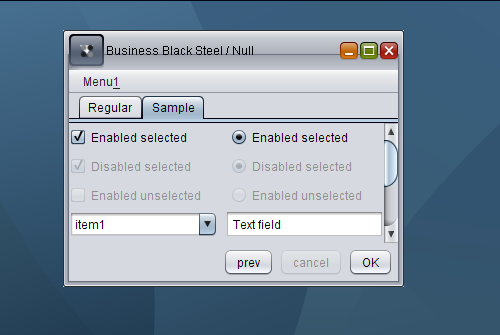
As you can see, while the desktop pane has a nice gradient image, other visuals still need to be improved, including the title pane main button, the title pane horizontal line and unselected enabled checkboxes and radiobuttons (they are marked as disabled and do not respond to mouse events).
It’s not clear how the community should report bugs. The feedback section points to the Swing & AWT forum, while the changelist shows that internally created bugs use the ancient and not so trustworthy bug parade.
