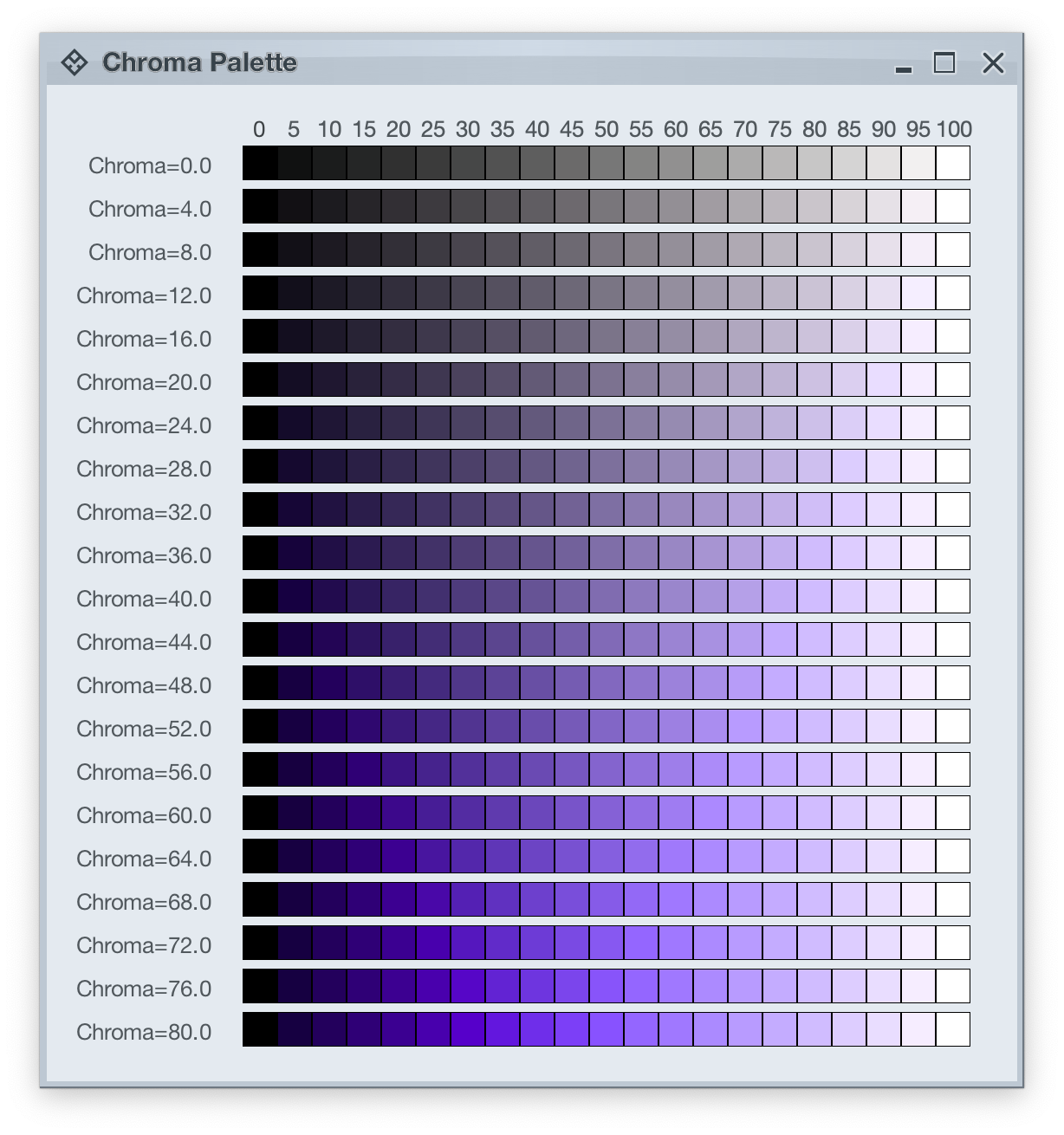
Picking up where the first part ended, let’s take another look at how HCT colors look like across different values of chroma and tone, now keeping hue constant at 300:
The next step is to introduce two related concepts – color tokens and containers. Radiance has three types of containers:
A container has three visual parts:
Each one of these parts can be rendered by the following tokens (single or a combination, such as vertical gradient):
- For surface
containerSurfaceLowestcontainerSurfaceLowcontainerSurfacecontainerSurfaceHighcontainerSurfaceHighestcontainerSurfaceDimcontainerSurfaceBright
- For outline
containerOutlinecontainerOutlineVariant
- For content
onContaineronContainerVariant
Let’s take a look at how these are defined and layered:
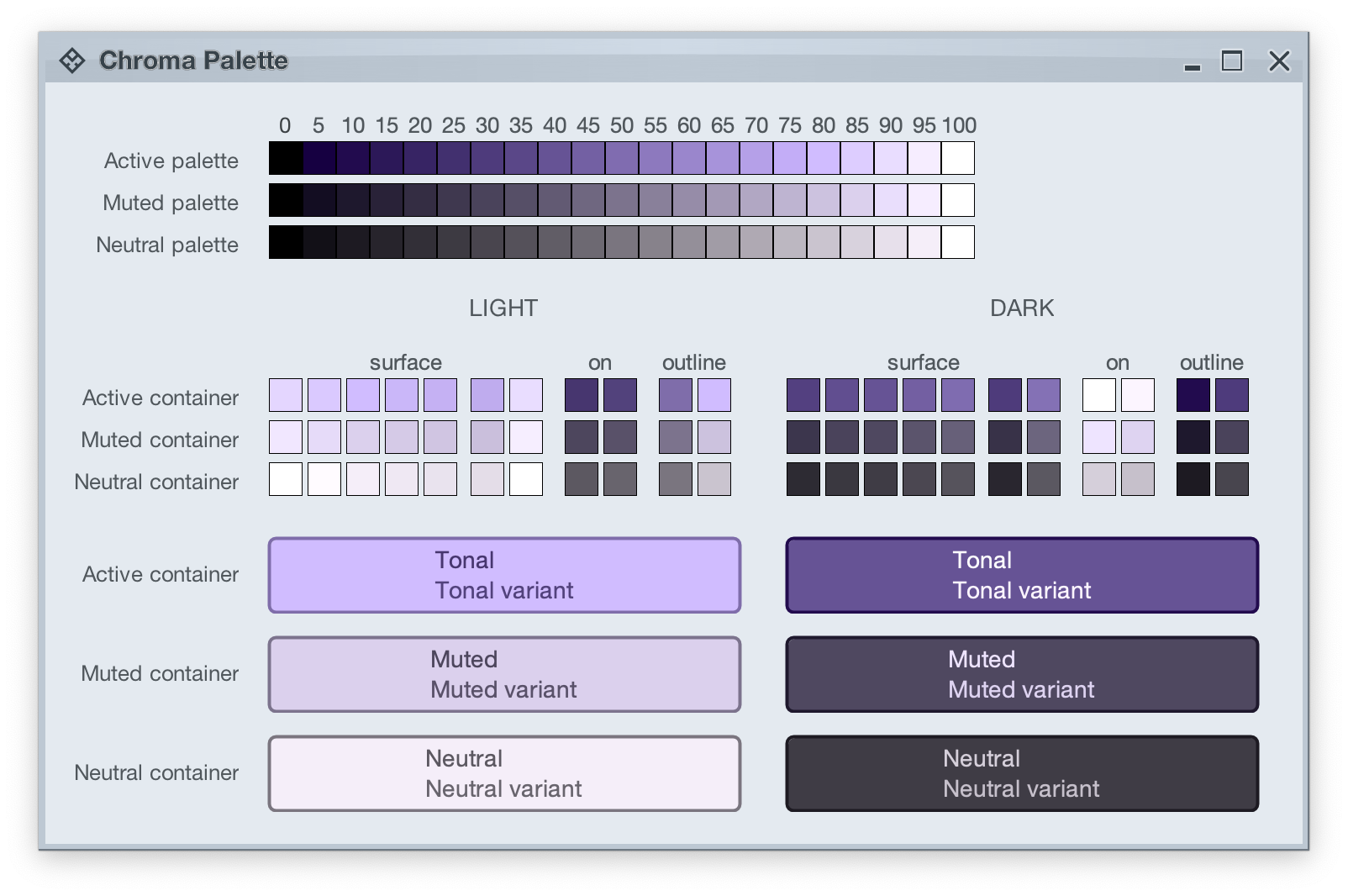
The top section in this image shows three tonal palettes generated from the same purple hue, but with different chroma values – 40 for active, 18 for muted, and 8 for neutral. The active palette has higher chroma, the muted palette has medium chroma, and the neutral palette has lower chroma. Even though these three palettes have different chroma values, the usage of the same hue creates a visual connection between them, keeping all tonal stops in the same “visual space” bound by the purple hue.
The next section shows surface, outline and content color tokens generated from each one of those tonal palettes. The tokens are generated based on the intended usage – light mode vs dark mode:
- Surface tokens in light mode use lighter tones, while surface tokens in dark mode use darker tones.
- Content tokens in light mode use darker tones, while content tokens in dark mode use lighter tones.
- Outline tokens in light mode use medium tones, while content tokens in dark mode use darker tones.
The last section shows sample usage of these color tokens to draw a sample container – a rounded rectangle with a piece of text in it:
- The container background fill is drawn with the
surfaceContainer color token.
- The container outline is drawn with the
containerOutline color token.
- The text is drawn with the
onContainer color token.
Let’s take another look at this image:
There is a clear visual connection across all three tonal palettes that are generated from the same purple hue, but with different chroma values. This visual connection is then reflected in the final visuals of our containers, across all three types (active, muted and neutral), both in light mode and in dark mode.
The color system provides strong guarantees about contrast ratio between surfaces and content, and at the same time it keeps all container tokens visually connected.
And now we can take the next step – how Radiance components are rendered.
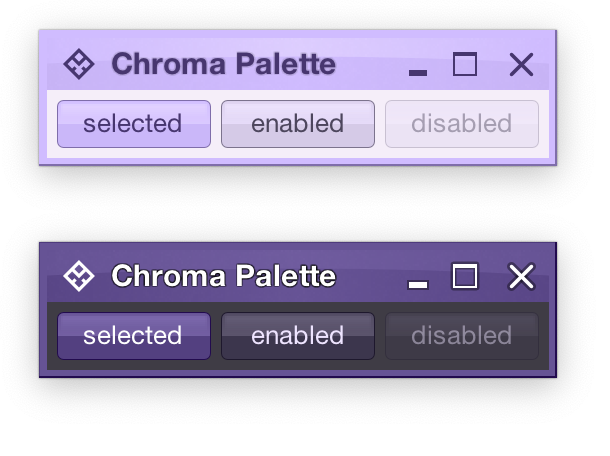
Radiance treats every element as a container, and Radiance draws every element with container color tokens.
For the main content area:
- The panel with the 3 buttons is a neutral container. Its background is rendered with the
containerSurface color token.
- The selected toggle button is an active container.
- The enabled button is a muted container.
- The disabled button is a muted container. The draw logic uses the three
xyzDisabledAlpha tokens for rendering the background, the border and the text.
- All buttons use the same color tokens:
containerOutline for the borderonContainer for the text- A combination of various
containerSurfaceXyz tokens for the gradient stops of the background fill
- What is different between drawing a selected button and an enabled button? The draw logic uses the same tokens (surface, outline and content). The difference is that a selected button is an active container while an enabled button is a muted container. In this particular case, an active container uses a higher chroma value as the seed for its tonal palette, resulting in more vibrant purple colors – while an enabled container uses a lower chroma value as the seed for its tonal palette, resulting in more muted purple colors.
- What is different between drawing an enabled button and a disabled button? The draw logic uses the same tokens and the same muted container type. The only difference is in the alpha tokens applied to the surface, outline and content color tokens during the drawing pass.
For the title area, the application of color is the same:
- The background is rendered with a gradient that uses a number of
containerSurfaceXyz color tokens
- The text and the icons are rendered with the
onContainer token
Finally, the window pane border is rendered with a combination of containerSurface and containerOutline / containerOutlineVariant color tokens.
And one last thing – these two UIs are rendered with the same tokens, applying the same container types to the same elements (buttons, title pane, panels). The only difference is the underlying mapping of tokens in light and dark mode:
- Active container in light mode maps
surface color tokens around tone 80, while in dark mode the same tokens are mapped around tone 40. The same distinction applies to outline and content tokens.
- Muted container in light mode maps
surface color tokens around tone 85, while in dark mode the same tokens are mapped around tone 32. The same distinction applies to outline and content tokens.
- Neutral container in light mode maps
surface color tokens around tone 95, while in dark mode the same tokens are mapped around tone 26. The same distinction applies to outline and content tokens.
In the next post we’ll take a look at how the intertwining concepts of color tokens and containers are used to build up the visuals of other Radiance components.
As I wrote in the last post, Radiance 8.0 brings a new color system, code-named Chroma. It’s been 20 years since I started working on Substance back in spring 2005. A lot has changed in the codebase since then, and certainly a lot has changed in the world of designing and implementing user interfaces around us. The most prominent thing has been the meteoric rise of design systems, and the structured approach they brought to managing design consistency at scale.
One of the earliest concepts in Substance was the idea of a color scheme. A color scheme was a set of six background and one foreground colors:
- Ultra light
- Extra light
- Light
- Mid
- Dark
- Ultra dark
- Foreground
Substance used a combination of these colors to draw the visuals of buttons and other components:

Where the inner fill might be a gradient using extra light, light and mid, the specular highlight would use ultra light, the border would use a gradient with ultra dark and dark, and the text would use foreground.
Over time, the color subsystem in Substance and later Radiance grew more features, and with every customization layer it accumulated, it became more difficult to keep a simple mental model of how colors are defined. And so, about 3 years ago, I started thinking about replacing that color subsystem with a more structured approach. Eventually, I chose to start with the color system that underpins the Material design system, along with customizing it to fit the needs of Radiance.
Material uses a new color space named HCT, which stands for hue+chroma+tone. To introduce these axes, let’s take a look at the illustration of a perceptually accurate color system introduced by professor Albert Munsell in the early 1900s:
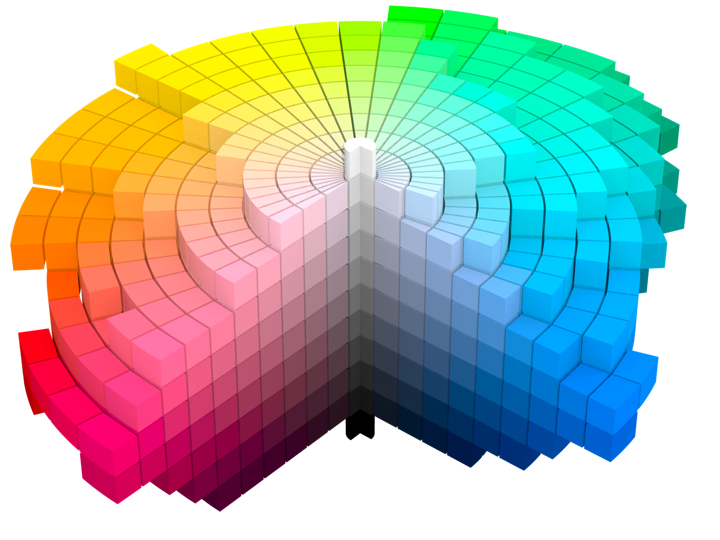
Courtesy of Wikipedia. Source by SharkD, derivative work of Datumizer. Licensed under CC BY-SA 3.0 License.
The human eye organizes color by three dimensions – hue, colorfulness, and lightness. In the cylindrical arrangement above:
- Hue corresponds to the angle on the color wheel. Hue distinguishes between colors such as red, green or purple.
- Colorfulness is the axis that starts at the center of the cylinder and projects outwards. Colors closer to the center are less saturated and vibrant. Colors close to the edge are more saturated and vibrant – all the while staying with the same hue.
- Lightness is the vertical axis in this cylinder. Colors at the top layers of the cylinder are lighter, closer to white. Colors at the bottom layers of the cylinder are darker, closer to black. All the while, a vertical “stack” of colors stays with the same hue and the same colorfulness.
This approach is the foundation of the HCT color space created for the Material design system:
- H is for hue. Hue is in [0..360] range – see below for the visual mapping.
- C is for chroma (colorfulness). Chroma is a non-negative value, with a different maximum for a particular combination of hue and tone.
- T is for tone (lightness). Tone is in [0..100] range, where 0 is full black and 100 is full white.
Let’s take a look at how the HCT colors look like across different values of hue and tone, keeping chroma constant at 80:
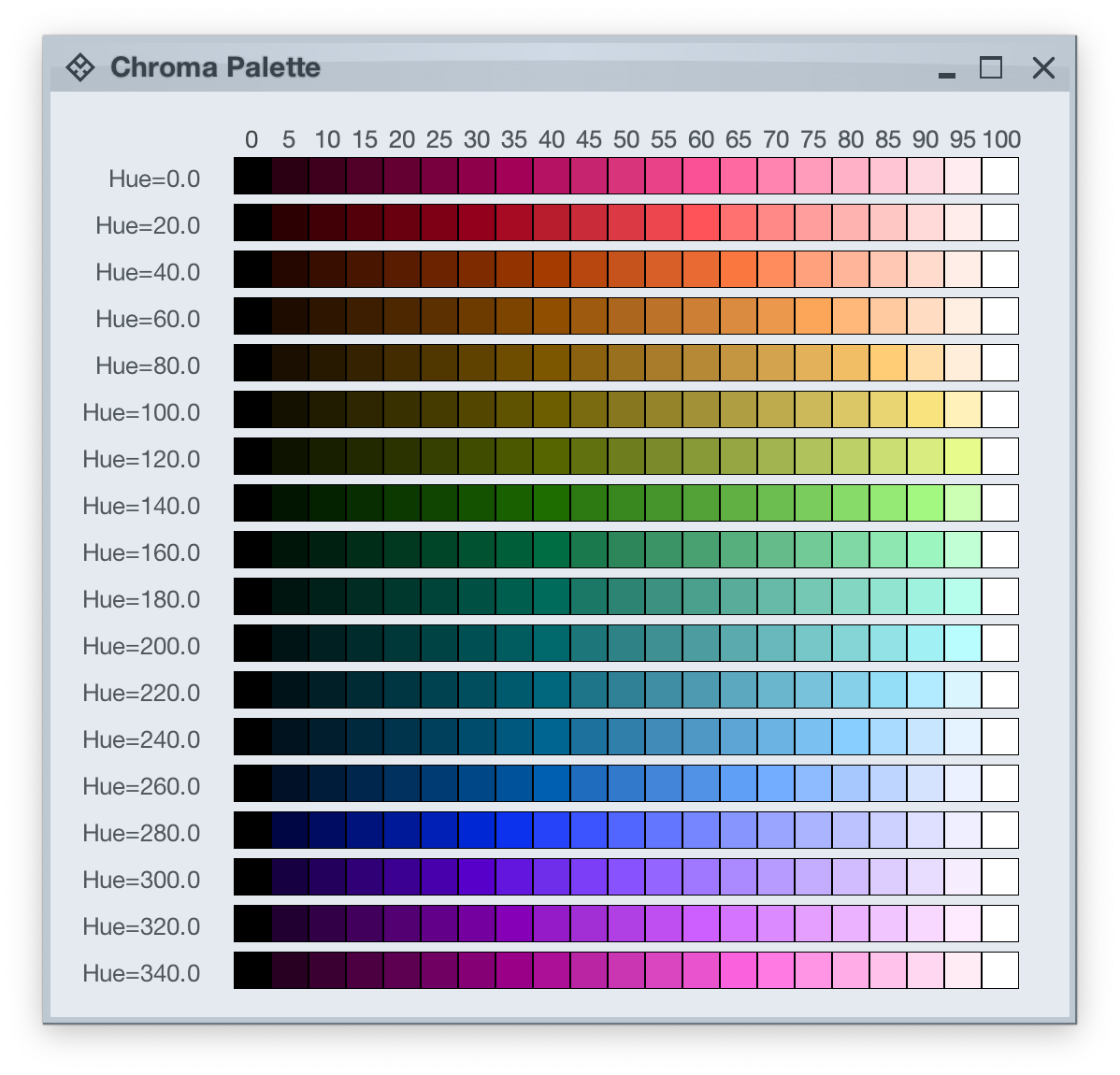
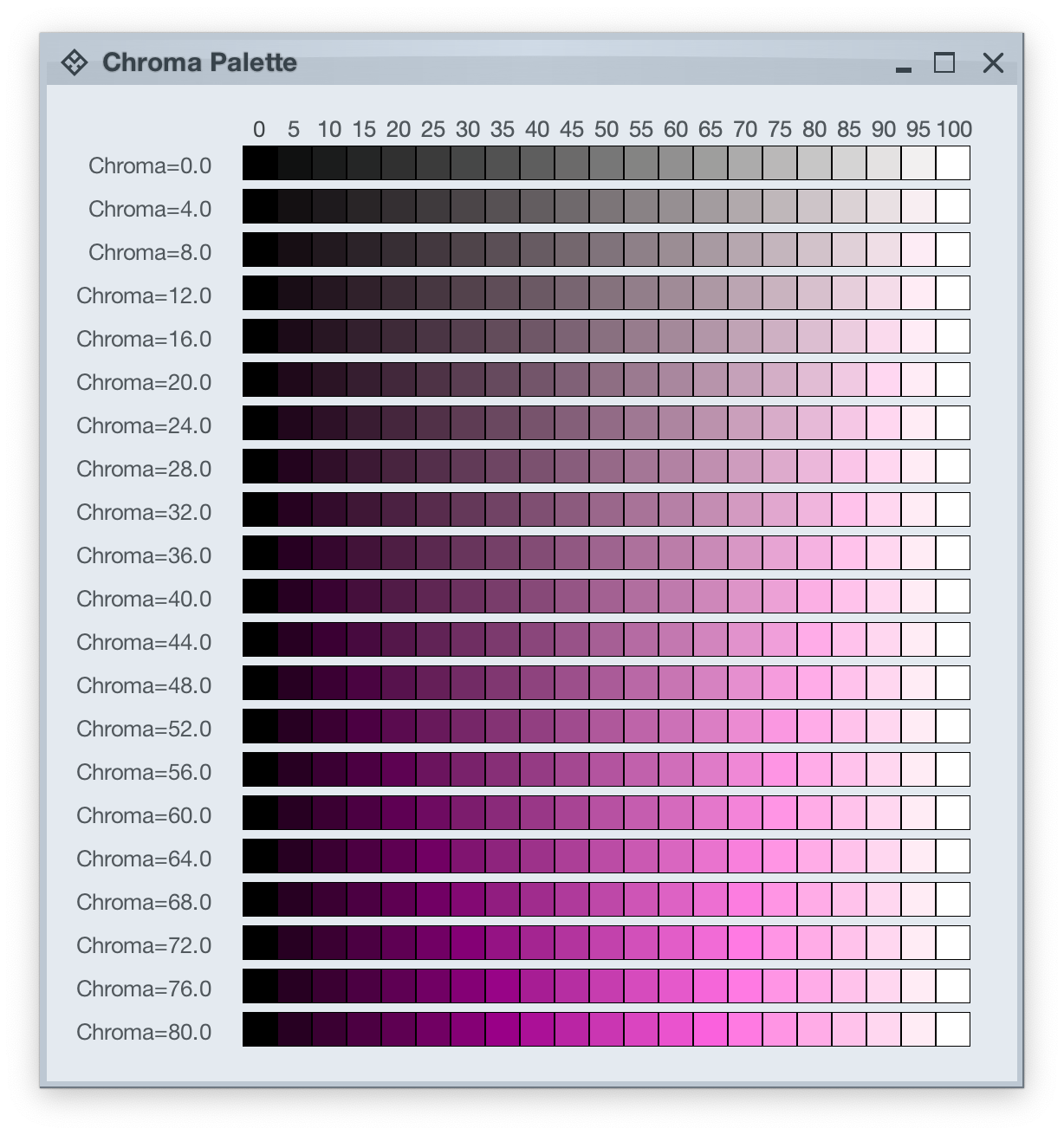
And this is a look at how the HCT colors look like across different values of chroma and tone, keeping hue constant at 340:
In the next post we’ll take a look at the concept of color tokens, and how they are used to build up the visuals of various components in Radiance.
It started back in early 2005 with an idea to recreate the visuals of macOS Aqua buttons in Java2D
and quickly grew to cover a wider range of Swing components under the umbrella of Substance look-and-feel, on the now discontinued java.net. The name came from trying to capture the spirit of Aqua visuals grounded in physicality of material, texture and lighting. The first commit was on April 15, 2005, and the first release of Substance was on May 30, 2005.
A few months later in September 2005, I started working on Flamingo as a proof-of-concept to implement the overall ribbon structure as a Swing component. Later in 2009, common animation APIs were extracted from Substance and made into the Trident animation library, hosted on the now as well discontinued kenai.com.
After taking a break from these libraries in 2010 (during that period the various libraries were forked under the Insubstantial umbrella between 2011 and 2013), I came back to working on them in late 2016, adding support for high DPI displays and reducing visual noise across all components. A couple years later in mid 2018 all the separate projects were brought under the unified Radiance umbrella brand, switching to the industry standard Gradle build system, publishing Maven artifacts for all the libraries, and adding Kotlin DSL extensions.
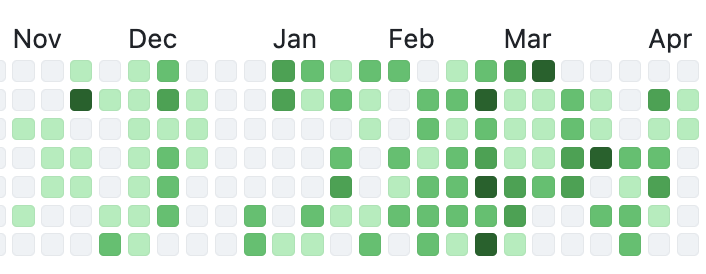
And now, twenty years after that very first public Substance release, the next major milestone of the Radiance libraries is here. Radiance 8, code-named Marble, brings the biggest rewrite in the project history so far – a new color system. Code-named Project Chroma, it spanned about 700 commits and touched around 27K lines of code:
Radiance 8 uses the Chroma color system from the Ephemeral design library, which builds on the core foundations of the Material color utilities. Over the next few weeks I’ll write more about what Chroma is, and the new capabilities it unlocks for Swing developers that use Radiance as their look-and-feel. In the meanwhile, as always, I’ll list the changes and fixes that went into Radiance 8, using emojis to mark different parts of it:
💔 marks an incompatible API / binary change
🎁 marks new features
🔧 marks bug fixes and general improvements
A new color system
Project Chroma – adding color palettes in Radiance
Theming
- 🔧 Use “Minimize” rather than “Iconify” terminology for window-level actions
- 🔧 Fix application window jumps when moving between displays
- 🔧 Fix exception in setting fonts for
JTree components
- 🔧 Consistent handling of selection highlights of disabled renderer-based components (lists, tables, trees)
- 🔧 Always show scroll thumb for scrollable content
- 🔧 Fix issues with slider track and thumb during printing
- 🔧 Fix visuals of internal frame header areas under skins that use matte decoration painter
Component
- 🎁 Update flow ribbon bands to accept a
BaseProjection as components
- 🔧 Fix user interaction with comboboxes in minimized ribbon content
- 🔧 Fix application of icon filter strategies to ribbon application menu commands
- 🔧 Fix passing command overlays to secondary menu commands
- 🔧 Fix crash when some ribbon bands start in collapsed state
- 🔧 Fix active rollover / pressed state visuals for disabled command buttons
- 🔧 Fix command buttons to be updated when secondary content model is updated
- 🔧 Fix display of key tips in collapsed ribbon bands hosted in popups
The new color system in Radiance unlocks a lot of things that we’ve seen in modern desktop, web and mobile interfaces in the last few years. If you’re in the business of writing elegant and high-performing desktop applications in Swing, I’d love for you to take this Radiance release for a spin. Click here to get the instructions on how to add Radiance to your builds. And don’t forget that all of the modules require Java 9 to build and run.
Less than one year to go until it celebrates its 20th anniversary, it’s time for the next release of Radiance. It’s a minor one, focusing on stability and bug fixes. First, I’m going to use emojis to mark different parts of it like this:
💔 marks an incompatible API / binary change
🎁 marks new features
🔧 marks bug fixes and general improvements
Component
- 💔 Revisit circular progress indicators
- 💔 Do not force BIG_FIT_TO_ICON presentation state for command buttons configured with custom icon dimension
- 🔧 Fix visuals of disabled command buttons under rollover state and
never background appearance strategy
- 🔧 Fix inconsistent font metrics of label texts during printing
- 🔧 Fix crash on computing the resize sequence of flow ribbon bands with 2 components
- 🔧 Fix ribbon band content disappearing after a certain combination of user interactions with the ribbon on Windows OS
Theming
Radiance focuses on helping you make elegant and high-performing desktop applications in Swing. If you’re in the business of writing just such apps, I’d love for you to take this Radiance release for a spin. Click here to get the instructions on how to add Radiance to your builds. And don’t forget that all of the modules require Java 9 to build and run.

