Since this article was written in 2008, all the functionality discussed below has been exposed as officially supported public APIs. See the conversion table at the end of this documentation page for full information.
I first spotted it about a month ago, and today’s build 12 of JDK 6.0u10 delivers on the promise – translucent and shaped windows with core Java classes only!
So, what do you do? First, head over to the JDK6 space at java.net and install 6u10 build 12. After that, you need to point to that install from your project (either IDE or a build script). As Richard mentioned in his Javaposse’s spot, Sun couldn’t publish the relevant APIs in a java.* or javax.* package since officially 6u10 is still not considered a major release. So, the APIs are in com.sun.awt.AWTUtilities. Of course, this may change its place (like Nimbus did), but you can at least start exploring it.
There are a few public static methods in this class, and since the signatures are self-explanatory, you don’t really need the source code. For starters, the inner Translucency enum has three values:
- PERPIXEL_TRANSPARENT – ability to create a shaped window
- TRANSLUCENT – ability to create a translucent window
- PERPIXEL_TRANSLUCENT – ability to create a translucent shaped window
To test support for a specific translucency mode, use AWTUtilities.isTranslucencySupported(Translucency) API. To test whether the specific GraphicsConfiguration supports translucency, use AWTUtilities.isTranslucencyCapable(GraphicsConfiguration) API. This Java class is a simple test utility that illustrates the usage of these two methods. Best thing – even on my Windows 2003 server machine these APIs return true!
Once you know that a specific translucency mode is supported, it’s time to create a shaped and / or translucent window. Let’s start with a simple frame with a few controls (Simple window – java class). Here is how it looks like, with a button, a check box, a radio button and a progress bar:
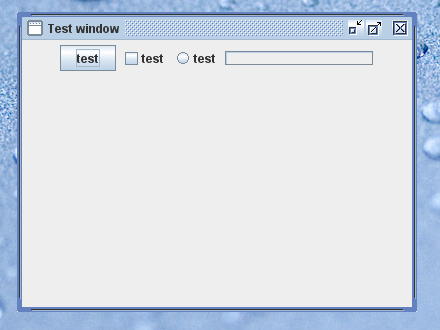
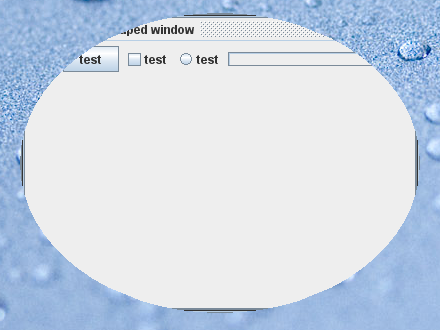
Let’s make it shaped (Shaped window – java class). For this, we use AWTUtilities.setWindowShape(Window, Shape). It’s hard to say without seeing the code, but the window has to be undecorated – call JFrame.setDefaultLookAndFeelDecorated(true). Otherwise the window is shown in usual rectangular shape. It would be nice to have a boolean return value that indicates a success of the operation. Here is how our window looks now:
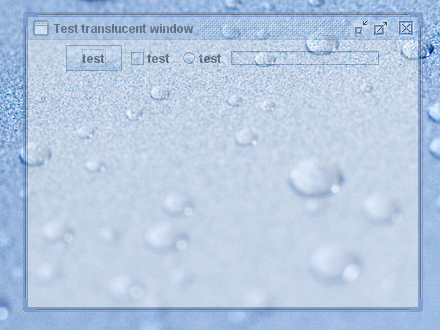
Let’s make a translucent window (Translucent window – Java class). For this, we use AWTUtilities.setWindowOpacityWindow, float). As you can see, the translucency factor is global, and (at least for now) you can not control translucency of each pixel. Here is how our window looks like with 50% opacity:
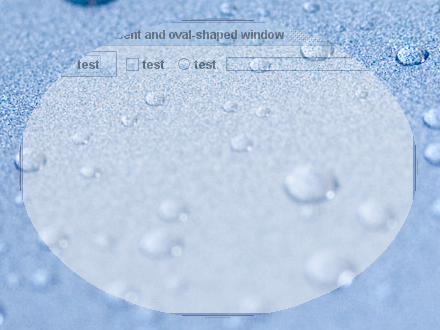
And you can combine both calls to have a translucent and shaped window (Translucent shaped window – Java class):
There are a few other additional public methods in AWTUtilities:
- getWindowOpacity(Window)
- getWindowShape(Window)
- setWindowOpaque(Window, boolean)
- isWindowOpaque(Window)
I think that the only two things that i’m missing is the per-pixel translucency support and soft-clipping of shaped windows (this would depend on the first item).
Congratulations to the AWT team for making this happen!
Here are some Swing links that you might have missed during this week:
- Daniel Spiewak walks through the steps of creating a simple form, from sketching the design on a piece of paper to implementing it in code. Personally, i felt that the recommendation to select the layout that the specific developer feels comfortable with is not very good for long-term maintainability, and the team would be much better off with a solid and well-known third-party layout manager such as FormLayout. Not to mention that the resolution independence is a very important topic which should not be dismissed lightly.
- Wim Deblauwe writes about the intricacies of providing responsive UIs with SwingWorker, using a very basic and common scenario of wiring a progress listener to a long background task.
- On a related subject, Carl from Palantir dives into the SwingUtilities.invokeAndWait and its behavior in thread interruption scenarios.
- Thierry Lefort continues his explorations of table-based data visualisation techniques, using the JXTable component from SwingX component suite to provide filtering and highlighting capabilities. The second part uses a color utilities class to provide distinctive highlighting on selected cells.
- Tim Dalton posts an update on the progress of his SQUIB project that provides Scala bindings for Swing components. Reading the code examples on his efforts in Scala and the parallel efforts in Groovy i can’t help but think it is still not much more than syntactic sugar. Indeed, you save a few constructs here and there (which is not necessarily a good thing, at least in the short run). I’m not really sure what am i expecting, but i’m definitely lacking a “wow” factor, so to speak. Something that would make me want to switch to Groovy or Scala for my hobby dabblings in UI technologies.
- Jan Erik Paulsen has a teaser on the new application that he is working on in Teppefall Labs. Called Teppefall Capture, it allows capturing pictures and videos from an attached (web) camera. He rightfully mentions the abysmal state of affairs with respect to anything remotely related to video, and hopefully this situation will be addressed this year. My number one Java desktop wish for 2008 – where art thou?
- Chet Haase has announced that he left the Swing-land to work on Flex SDK. Personally, i wish him nothing but the best, and hope that he will have the same level of passion once the initial excitement over the new technology wears out.
Here are some Swing links that you might have missed during this week:
- Thierry Lefort joins the ranks of Swing bloggers and opens his blog with a slew of posts. The first entry talks about rendering bar charts in table renderers, the second one adds zooming capabilities to tables (with a very interesting zooming on selection mode) and the third one shows how to use Swing worker in a modal cancellable dialog.
- Geertjan Wielenga has a three-part introduction series to Beans Binding. Part 1, part 2 and part 3 walk through the various parts of the Beans Binding project.
- Chet Haase has posted a video for his QCon 2007 talk. While there is nothing new there (it has been held last November), you might still be interested in a general overview of what is scheduled for 6.0 update N and 7.0.
- Joshua Marinacci seems to confirm my guess on exporting Adobe artwork into JavaFX and SceneGraph formats. Here is what he says in the comments on a non-directly related blog entry: [h]owever, at JavaOne we will show you how to easily pull graphics created by designers using traditional design tools into your JavaFX applications
- Alexander Potochkin reports on providing more support for JPopupMenus on system tray. Based on the comments on this entry, and on earlier entry by Artem Ananiev, this is another sore point for desktop-integrated Swing applications.
- Finally, it looks like the next build (12) of 6.0 update N will have significant new functionality for Swing developers. In addition to a few performance-related issues on the new Direct3D pipeline, two new enhancements that i’ve talked about earlier have been marked as fixed for 6.0u10-b12: 6656651 for native text rasterization, and 6655001 for window translucency. Now this is definitely worth the wait.
The release candidate for version 3.0 of Flamingo component suite (code-named Deirdre) is available. The goal of this project is to provide a small and cohesive set of powerful UI components that allow creating modern applications that provide visual functionality similar to or superseding that of Vista Explorer and Office 2007. The components provide consistent visuals under the existing core and third-party look-and-feels, respect the DPI settings of the user desktop and follow the core Swing guidelines in the external APIs and the internal implementation details.
The component suite includes:
The project is licensed under BSD license and requires JDK 6.0. You can see the demo applications here. The binary and source bits are available here. The final release is scheduled for February 18.
