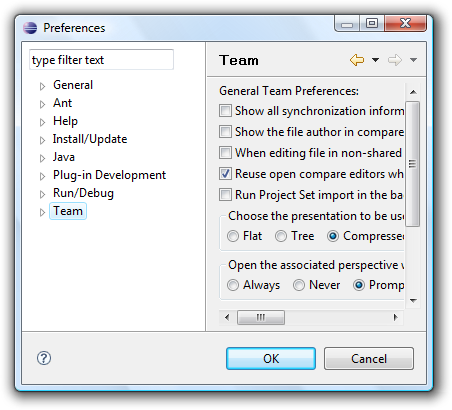
One item suggested by Romain a year ago and missing up until now in Substance was an option to add lighter inner border to different components. Here is a sample screenshot of a few controls under Windows Vista:
As you can see, pretty much all the controls have a lighter inner border. Look at the checkboxes, radio buttons, scroll bars and buttons. Note that even the highlight indication on the selected list item has a lighter inner border. This approach was adopted by Microsoft designers back in Windows Vista, and has found its way into a few Synthetica themes as well.
Finally, i got around into providing this functionality in the latest binary drops of Substance. A handful of core skins now use different kinds of inner border painters, and here are a few examples.
We’ll start with Autumn skin. Here is how it looked before:
And here is how it looks now:
As you can see, pretty much all the relevant controls have lighter inner borders, including buttons, checkboxes, radio buttons, combos, text fields, scroll bars and tabs. Here is one more “before” shot under Autumn:
And here is the same application under the latest drop:
As you can see, you get consistent borders on the selected elements in lists and trees as well. This is due to the generic internal implementation of Substance border painting, which means that you get it on a very wide range of controls (including progress bars, text components, sliders and menus as well) for a very small increase in the library size.
Let’s move on to the Business skin. Here is the “before”:
And the last one is Raven Graphite Glass. The “before” screenshot:
And the “after”:
For more details on how to use the new inner border painter on custom Substance skins, read the source code of the relevant core skins mentioned above (until the documentation is ready).
This is the fifth part in the ongoing series about advanced animations on core Swing components built-in to the latest binary drops of Substance look-and-feel.
The first part showed rollover and selection background animations on menus, sliders, tables and table headers
The second part showed rollover foreground animations on menus under a skin that uses dark background fill on menubars
The third part showed rollover and selection background and foreground animations under a mixed dark-light theme
The fourth part showed animations on the Magma skin that mixes dark and light color schemes for both background and foreground colors.
Was there anything missing from the animations under Magma? Quite a few important visuals of core Swing components, namely icons. Behind the scenes, the current look-and-feel is responsible for creating icons for different parts of core Swing components:
Title pane icons (close, maximize, minimize, restore) under decorated mode
Arrow icons of combobox buttons
Arrow icons of scrollbar buttons
Arrow icons of spinner buttons
Arrow icons of nested menus
Up until now, these icons did not participate in the rollover, selection, press and arm animations. The latest 4.1dev drop of Substance (code-named Lima) provides support for these animations out of the box. While you might not notice these under most Substance skins, some of them stand out a little.
The first example shows the title pane button icons under the Business Black Steel skin. It is different from other skins in that it uses a dark theme for title panes and menu bars. In default state, the title pane button icons are painted in white. In active (rollover, press) state, they are painted in black on metallic steel background. Here is a video that shows the animation sequence under slower animation setting:
Here is how the title pane button icons animations look like under the Magma skin (under the default animation setting):
And here is how the Magma animations look like on combobox button arrow icons:
The same animation sequence is implemented on scroll bar buttons, spinner buttons and nested menus. You can play with the Substance test application, especially with Business Black Steel, Nebula and Magma skins.
The previous teaser post showed a small video with “ripple” effects – an application showing a ripple overlay with waves originating on mouse click, bouncing off component borders and decaying over time, along with the superposition effects. It gives me a great pleasure to announce the first alpha drop of the Strider project (code-named Alento), that will provide these effects to Swing applications.
It provides a custom glass pane that can be installed and configured in the following way:
The following RippleGlassPane methods can be used in the application code:
ignoreClicksOn – mouse clicks on the specified components will not result in a ripple wave.
markAsWall – bounds of the specified components will be marked as walls, resulting in ripple waves bouncing off.
markAsMedium – area of the specified components will be marked as medium, resulting in ripple waves propagating slower.
The current drop is in alpha stage, lacking a few features (proper support for resizing and granularity). It’s very small (about 28KB, and unlikely to gain much more as the development continues), and can be used in any Swing application. It should be noted that it’s quite CPU intensive, since the entire wave simulation is done in software.
Once again, thanks to Paul Falstad who donated the original code under the BSD license. Stay tuned for more.
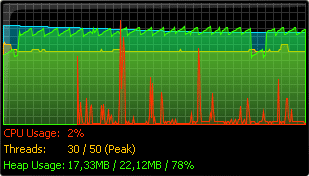
Wolfgang is writing about a new component available in the latest release of Synthetica Addons called System Monitor:
If you’re interested about details on how to fetch the system information, look at this article i’ve written a few weeks ago for java.net. While some information is available in the System and Thread classes, you can access much more using JMX MBeans, including the information on threads and memory.
Note that with JMX, you can get the information not only on the current JVM, but on any running JVM that supports JMX. For now, it looks like the System Monitor component only allows tracing information on the current JVM (but i might be wrong).