I am not a professional designer, but i’m always ready to learn from people who have a finer eye and more experience than me. Last week i posted a screenshot of the newly redesigned enterprise application from Lawson (designed by frog design). As i hinted in that entry, some of the visuals are planned to be added in the next releases of Substance look-and-feel. Well, you don’t have to wait too much, at least for one of the visuals of this application.
First, here is a screenshot of the table component from that application:

and here is the table design from Nimbus:

There are a few interesting and subtle details here, all contributing towards very clean and elegant visuals of a table wrapped in a scroll pane:
- Continuity of the table border and scroll bar border
- Continuity of the table header, extending to the top-right corner of the scroll pane
- Continuity of the striped background
- Continuity of the selected background
Let’s see how such a table looked like in the previous Substance release (4.1 code-named Lima):

Non-native font rendering aside, there are quite a few problems:
- Even though the table grid is turned off, there are still white separator lines clearly visible on striped rows and especially on the selected row
- Too many lines on the table header – each cell has its own border
- Extra border to the right of the scroll bar results in additional visual noise
- The selection background doesn’t extend to the perceived table bounds on both sides
So, how does it look under the latest 4.2 drop that is scheduled to be the RC build if no bugs are found until Monday?

This addresses quite a few of the issues (continuity, borders, background, scroll pane corner component, native text rendering), and the end visual result is much cleaner. And here is the same table under right-to-left orientation:

Still few things to be addressed in the RTL mode, such as the location of the sort icon and the alignment of the default text renderers.
How does Substance fare against the competition? The same application under Nimbus from the latest 6.0u10 drop (obviously it is still work in progress):

While largely faithful to the design, there’s the off-by-pixel discrepancy where the table header meets the scroll bar, wrong foreground color of selected cells and too little vertical space for the rows (see how the icons “touch” the rows above them). The RTL mode breaks the visuals of the scroll bar and introduces more off-by-pixel’s in table header and scroll bar:

How about Synthetica? Here is the same application under Synthetica Blue Ice:

It has most of the same issues as Substance did in version 4.1, including the extra white lines on selected row, double border on the right hand side of the scroll bar, table header that doesn’t blend with the outer border and too little space on the left hand side of header cells. The RTL mode doesn’t have additional problems:

The Substance screenshots above were taken under the Nebula skin which uses some of the color schemes from the Nimbus design. Obviously, the same visual noise reduction applies to all other Substance skins. Here is the same application under the Business skin:

and the RTL mode:

These changes are available in the latest 4.2dev drop of Substance. The release candidate is scheduled for January 21st (this Monday) and the release is scheduled for February 4th. If you find any bugs, you can post a report on the project mailing lists, issue tracker or in a direct mail [kirillcool yahoo com].
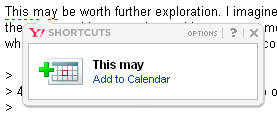
This is what you get when your e-mail provider tries to be too clever, automatically parsing the incoming e-mails and suggesting adding events to your calendar. Most of the time it gets it right, but sometimes it goes a little astray:
Today I am thrilled to have the first guest spot blogger on “Pushing Pixels”. Christopher Deckers, the developer of DJ project that brings rich native features to Swing applications, has graciously agreed to post a summary of his findings on using the DISPOSE_ON_CLOSE window close mode in WebStart environment. Note that a similar scenario was reported and fixed on another “rogue” VM thread.
After hours of coding, you finally release your wonderful Swing application. It is using Java 1.4 (or later), it was tested locally and it was terminating properly. You package it and release it as a Webstart application. Unfortunately, you are using setDefaultCloseOperation(DISPOSE_ON_CLOSE) on your JFrames. Soon, users complain that your application remains in memory after they hit the close button of the last frame.To track down this abnormal behavior, you read the AWT threading rules again, detailed in the following file from the javadoc:
“Prior to 1.4, the helper threads were never terminated.Starting with 1.4, the behavior has changed as a result of the fix for 4030718. With the current implementation, AWT terminates all its helper threads allowing the application to exit cleanly when the following three conditions are true:
* There are no displayable AWT or Swing components.
* There are no native events in the native event queue.
* There are no AWT events in java EventQueues.”
It sounds like you are respecting the rules, so something somewhere is misbehaving. The culprit seems to be Webstart.
The JVM should exit, which means there is a non-daemon thread alive in the system:
- The non-daemon thread is a Webstart-related system thread.
- The non-daemon thread is the event queue.
Creating a simple test case (an empty JFrame using DISPOSE_ON_CLOSE), we add a timer to dump all the threads a few seconds after we actually close the application.
Comparing a local run and a Webstart run, we see several additional threads in the latter case:
Javaws Secure Thread (non-daemon)
traceMsgQueueThread (daemon)
Image Fetcher 0 (daemon)
CacheCleanUpThread (daemon)
AWT-EventQueue-1 (non-daemon)
TimerQueue (daemon)
TimerQueue (daemon)
Surprisingly, we can see two UI threads (AWT-EventQueue-1 in addition to AWT-EventQueue-0) and a special Webstart thread named “Javaws Secure Thread“.
A quick test shows that if we forcibly kill the “Javaws Secure Thread” (using the not-so-recommended call to Thread.stop()), then closing the application succeeds.
This behavior leads to two conclusions: this Webstart thread is a non-daemon thread so the JVM cannot exit, and it also seems to post new events to the UI thread that restarts it.
Time to hunt for the code of the “Javaws Secure Thread“!
A quick search in jre\lib\javaws.jar and we can find its declaration: a class named SecureThread, nested in the com.sun.javaws.ui.JavawsSysRun class (the code can be found in deploy\src\javaws\share\classes\com\sun\javaws\ui folder of the JDK source distribution).
The code after simplification is roughly equivalent to the following:
class SecureThread extends Thread {
   public void run() {
      while(true) {
         doWork();
      }
   }
   public void doWork() {
      SwingUtilities.invokeLater(new Runnable() {
         public void run() {
            // stuff
         }
      }
      // other stuff
   }
}
All seems confirmed: Webstart does create a non-daemon thread, which continuously posts events to the UI thread.
The solution? Well, like back in the 1.3 days, use EXIT_ON_CLOSE on the main frame (if any) until this eventually gets fixed in webstart.
Here are some Swing links that you might have missed during this week:
- Alex Ruiz writes about the release 0.8 of FEST-Swing library for functional Swing GUI testing. It features a considerable number of new functionality and seems to be progressing smoothly towards the first production-ready release.
- Andres Almiray writes about release 0.4.4 of GraphicsBuilder, bringing a variety of new features from Swing to Groovy.
- Dave Gilbert writes about release 1.0.9 of the JFreeChart chart library, mainly featuring bug fixes and small API improvements. I wonder what happened to the 3D support that has been announced last July. Is there a big demand for 3D charts? Is it worth the development effort?
- Peter Weishapl writes about updates to the xswingx project that brings advanced capabilities to text fields, including prompts, buddy icons and search fields.
- Jeremy Wood (java.net nick mickleness) has an interesting project on java.net for slideshow transitions. It features an impressive array of very smooth and rich transitions that can be employed in slideshow components.
- Sun’s marketing machine seems to pick up the steam on the application framework and beans binding projects (even though the technical leads seem to be currently devoting their resources to the JavaFX related activities). Tech Day Events blog has a short overview of these two projects, while Frank Sommers interviews Shannon Hickey on the beans binding at Artima.
- And speaking of the main technical lead for the application framework JSR, Hans Muller kicks off the series on the new Scene Graph project, showing a few very basic capabilities. Chet Haase writes about the next evolution of the Timing Framework that is undergoing very significant changes for its inclusion in Scene Graph (and probably JavaFX / Mustang Update N). The first part talks about the API changes, and the second part introduces the new functionality.
- Tom Schindl writes about the first version of the UFacekit project that aims to bring a common layer on top of different UI toolkits, including GWT, SWT / JFace and Swing. This is a commendable effort, and it would be very interesting to see how the authors (Tom and James Strachan) are going to tackle the functionality missing in some of the UI toolkits. Would that be the least common denominator, optional extensions (with querying the toolkit capability), emulation of missing features or something else? Definitely worth tracking.
