As detailed in the previous post, Radiance 5.0.0 is out now. It marks a fresh milestone for the Swing libraries I’ve been working on since 2004, and closes the first major chapter in the journey to unify and streamline the way Swing developers can integrate my libraries into their projects.
This document details the changes made to modules, packages and individual API classes.
The next major undertaking for Radiance is to move towards direct rendering with no offscreen bitmaps. That might take a bit longer than the usual 6-month cycle. Keep on eye on this tracker for the progress.
It gives me great pleasure to announce the seventh major release of Radiance. Let’s get to what’s been fixed, and what’s been added. First, I’m going to use emojis to mark different parts of it like this:
💔 marks an incompatible API / binary change
🎁 marks new features
🔧 marks bug fixes and general improvements
Dependencies for core libraries
- Gradle from 7.1 to 7.2
- Kotlin from 1.5.10 to 1.5.31
- Kotlin coroutines from 1.5.0 to 1.5.2
Neon
Substance
Flamingo
- 🎁💔 Add reference to the ribbon as a parameter to all
OnShowContextualMenuListener methods
- 🎁💔 Align icon theming across all Flamingo components
- 🔧 Fix layout of command buttons in
TILE layout under RTL
- 🔧 Fix visuals of horizontal command button strips under RTL
- 🔧 Fix layout of anchored command buttons under RTL
- 🔧 Fix layout of command button popup content under RTL
- 🔧 Fix issues with updating ribbon gallery content
Photon
- 💔 Remove
SvgBatikIcon and SvgBatikNeonIcon
- 💔 Move Photon to be under
tools
General
As with the earlier release 4.0.0, this release has mostly been focused on stabilizing and improving the overall API surface of the various Radiance modules. As always, I’d love for you to take this Radiance release for a spin. Click here to get the instructions on how to add Radiance to your builds. And don’t forget that all of the modules require Java 9 to build and run.
And now for the next big thing or two.
I will take the next two weeks to fix any bugs or regressions that are reported on the 4.5.0 release. On the week of October 18th, all Radiance modules are going to undergo a major refactoring. While Radiance unified all of the Swing projects that I’ve been working on since around 2004, this unification was rather superficial. It made it easier to have inter-module dependencies. It made it easier to write documentation. It made it easier to schedule coordinated releases. But it didn’t make it easier to see what Radiance is.
In the last year or so I kept on asking myself the same questions over and over again.
If I started with these libraries today, will they still be using these disjointed codenames (Neon, Trident, Substance, Flamingo, not to talk about Torch, Apollo, Zodiac, Meteor, Ember, Plasma, Spyglass, Beacon, etc)? For somebody who wants to deep dive into the implementation details, are there places that are internally inconsistent? For an app developer who wants to get the most out of these libraries, does Radiance provide an externally approachable and consistent set of APIs?
The first step I’m taking to answer at least some of these questions is moving away from the codenames, and renaming everything based on the functional boundaries. And by everything I mean everything – modules, classes, methods, fields, variables, etc. It’s going to be a huge breaking change. But it’s something that I feel is way overdue for a project of this complexity. More specifically:
org.pushingpixels.trident -> org.pushingpixels.radiance.animationorg.pushingpixels.neon -> org.pushingpixels.radiance.commonorg.pushingpixels.substance -> org.pushingpixels.radiance.themingorg.pushingpixels.flamingo -> org.pushingpixels.radiance.componentorg.pushingpixels.substance.extras -> org.pushingpixels.radiance.theming.extrasorg.pushingpixels.ember -> org.pushingpixels.radiance.theming.ktxorg.pushingpixels.meteor -> org.pushingpixels.radiance.swing.ktxorg.pushingpixels.plasma -> org.pushingpixels.radiance.component.ktxorg.pushingpixels.torch -> org.pushingpixels.radiance.animation.ktxorg.pushingpixels.tools.apollo -> org.pushingpixels.radiance.tools.schemeeditororg.pushingpixels.tools.beacon -> org.pushingpixels.radiance.tools.themingdebuggerorg.pushingpixels.tools.hyperion -> org.pushingpixels.radiance.tools.shapereditororg.pushingpixels.tools.ignite -> org.pushingpixels.radiance.tools.svgtranscoder.gradleorg.pushingpixels.tools.lightbeam -> org.pushingpixels.radiance.tools.lafbenchmarkorg.pushingpixels.tools.photon -> org.pushingpixels.radiance.tools.svgtranscoderorg.pushingpixels.tools.zodiac -> org.pushingpixels.radiance.tools.screenshot
Classes that used codenames, such as SubstanceLookAndFeel, TridentConfig etc will be renamed to follow the functionality of the matching API sub-surface. For example:
SubstanceCortex -> RadianceLafCortexTridentCortex -> RadianceAnimationCortexSubstanceButtonUI -> RadianceButtonUI
This first round of refactoring will be the next Radiance release. It will not move classes between modules. It will not add or remove modules, classes or methods. Migrating from 4.5 to 5.0 will require a lot of import refactoring, and some amount of refactoring – wherever you are calling Radiance APIs in your code. Once 5.0 is out, the next release will have follow-up refactorings for cleaning up places that have not aged well.
What’s the other big thing that I alluded to earlier? I want to provide support for consistent application of custom visuals across all supported Swing components. In Substance, this is done with painters. Due to a complicated nature of some of these painters, pretty much since the very beginning Substance has been using cached off-screen bitmaps to maintain a good performance footprint. The very first time a component needs to be rendered in a certain visual state, Substance renders those visuals to an offscreen bitmap. Next time, if we already have a cached bitmap that matches the current state, we reuse it by rendering that bitmap on the screen.
While this model has served Substance (and, by extension, the Flamingo components) rather well, it has started to show significant cracks over the last few years. You can see more information in this bug tracker on the underlying issues, but the gist of it is rather simple – screens with fractional DPI settings (125% or 150%, for example) do not play well with rendering offscreen bitmaps. The end result is that rendering a hairline (one-pixel wide) element can be fuzzy, distorted, or not there at all on the screen.
It is going to be a long road, and it might mean that it might take longer than usual to get the next Radiance release out the door. My current goal is that by the end of it, Radiance does not use any offscreen bitmaps for any of its rendering, and that everything is rendered directly onto the passed graphics object. Lightbeam will certainly come in handy all through that process. Wait, excuse me, Lightbeam will be no more in a couple weeks. It’s going to be Radiance LAF Benchmark instead.
It gives me great pleasure to announce the sixth major release of Radiance. Let’s get to what’s been fixed, and what’s been added. First, I’m going to use emojis to mark different parts of it like this:
💔 marks an incompatible API / binary change
🎁 marks new features
🔧 marks bug fixes and general improvements
Dependencies for core libraries
- Gradle from 6.6.1 to 7.1
- Kotlin from 1.4.10 to 1.5.10
- Kotlin coroutines from 1.3.9 to 1.5.0
Substance
Flamingo
- 🎁 Add support for keyboard accelerators on ribbon commands
- 🔧 Fix ribbon application menu border color on skin switch
- 🔧 Fix exception on skin switch when the ribbon application menu is not shown
- 🔧 Fix for various visuals on multi-monitor setup with different screen densities
- 🔧 Fix even-odd coloring of command button panel groups
- 💔 Tweak implementation of
FIT_TO_ICON command button layout manager
Trident
- 💔 Rename
TridentConfig to TridentCortex
As with the earlier release 3.5.0, this release has mostly been focused on stabilizing and improving the overall API surface of the various Radiance modules. There’s still a long road ahead to continue exploring the never-ending depths of what it takes to write elegant and high-performing desktop applications in Swing. If you’re in the business of writing just such apps, I’d love for you to take this Radiance release for a spin. Click here to get the instructions on how to add Radiance to your builds. And don’t forget that all of the modules require Java 9 to build and run.
It gives me great pleasure to announce the fifth major release of Radiance. Let’s get to what’s been fixed, and what’s been added. First, I’m going to use emojis to mark different parts of it like this:
💔 marks an incompatible API / binary change
😻 marks new features
🤷♀️ marks bug fixes and general improvements
Dependencies for core libraries
- Gradle from
6.4.1 to 6.6.1
- Kotlin from
1.3.72 to 1.4.10
- Kotlin coroutines from
1.3.7 to 1.3.9
Substance
- 💔 Remove support for watermarks
- 💔 Convert
SubstanceSkin.ColorSchemes into an interface
- 😻 Support for overlay colors with
SubstanceSkin.setOverlayColor
- 💔 Support for specifying derived colors in color scheme files
- 😻 New API to mark a label as title pane text
- 😻 Text highlights that respect decoration areas
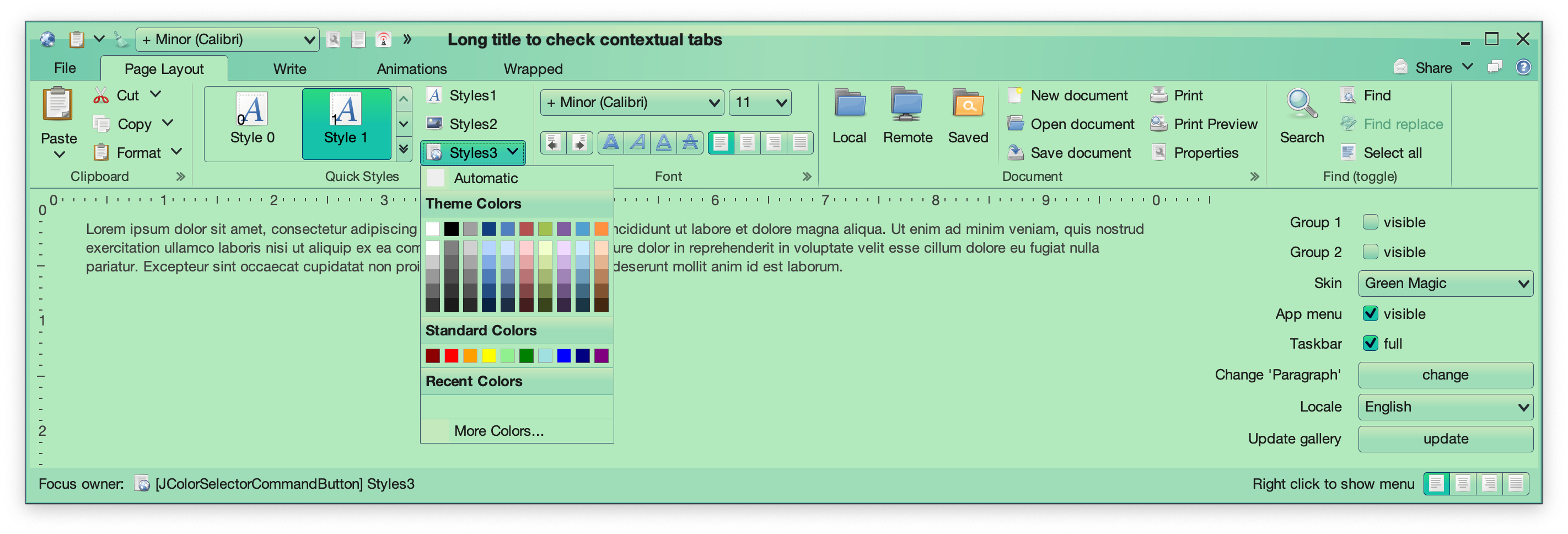
- 💔 Moved the Green Magic skin from
substance-extras to the core substance module (see the screenshot of this skin above)
- 💔 Aligned signatures of
ComponentState.getActiveStates and ComponentState.getAllStates
- 🤷♀️ Improved menu search widget UX
- 🤷♀️ Correct layout for edit context menu under RTL
- 🤷♀️ Fix concurrent modification exception thrown when ghost icon animations are enabled
Flamingo
- 💔 Pass command projection instead of command in ribbon contextual menu listener
- 💔 Remove
AbstractCommandButton class. Everything is in the JCommandButton class now.
- 😻 New
CommandButtonPresentationModel.Builder.setPopupHorizontalGravity API to contol horizontal alignment of command button popups
- 🤷♀️ Fix crash in opening a command popup menu from taskbar
- 🤷♀️ Fix memory leaks caused by model listeners
- 🤷♀️ Fix for root key tip chain not showing popup key tips of anchored commands
- 🤷♀️ Fix for overlays on ribbon popup content in the title pane / taskbar
Trident
- 🤷♀️ Fix inconsistent usage of conversion from duration fraction to timeline position
This release has mostly been focused on stabilizing and improving the overall API surface of the various Radiance modules. There’s still a long road ahead to continue exploring the never-ending depths of what it takes to write elegant and high-performing desktop applications in Swing. If you’re in the business of writing just such apps, I’d love for you to take this Radiance release for a spin. Click here to get the instructions on how to add Radiance to your builds. And don’t forget that all of the modules require Java 9 to build and run.
