Extended support for native video codecs in JMC
December 2nd, 2008 | 18 Comments »There’s nothing like the right link at the right time. Remy Rakic (Twitter alias lqd) has left a link to the apparent release jars of JavaFX Desktop 1.0 in the comments on the previous entry. So i’ve decided to see whether there is anything new in the JMC department since the last time i’ve looked at it.
In the JavaFX preview, the native code was shipped directly in the jmc.dll. The download folder has the native libraries available in three platform-specific jar files (one for Windows, Mac OS X and Linux each). For Windows, the jar contains four DLLs:
- jmc.dll as before
- on2_decoder.dll which would be presumably responsible for the new licensed decoders
- msvcp71.dll and msvcr71.dll which are parts of Visual C++ 7.1
Assuming that this download folder is going to be used as a centralized WebStart repository, i would venture to say that there is going to be some kind of built-in mechanism for extracting these DLLs at runtime and updating the java library path. However, in my experiments i had to extract them manually and point the -Djava.library.path to the folder that contains those DLLs. We’ll wait and see whether the final (and official) release will follow in the footsteps of SWT 3.3 that handles the locally run extraction automatically.
Apart from the new JMediaView class that is a lightweight Swing component I haven’t seen any new classes. However, this JMC drop can play all QuickTime content from the sample page, including H.264, MPEG-4, 3GPP and MPEG-2, as well as the full scale trailers from the Apple site (in H.264 format). The playback support goes a long way towards my number one wish for desktop Java in 2008, and it will be hopefully followed by the recording capabilities as well.
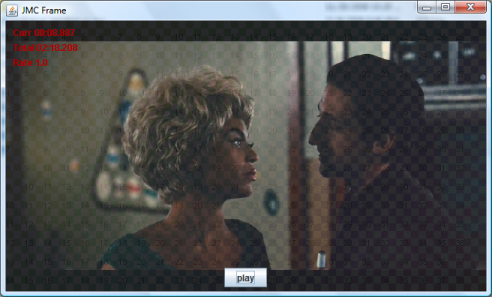
I’ve decided to dive a little bit deeper into the JMC internals and updated the JMCFrame class to show a skeleton implementation of a “home-grown” player. Instead of using ready-made classes such as JMediaPlayer, JMediaPane or JMediaView, i’m creating a MediaProvider from the specific URI and attaching a VideoRendererListener to its VideoRenderControl (i would guess that the JMedia* classes follow the same route, but without the source code it’s hard to tell). This certainly makes the code a little bit more complicated, but allows much greater flexibility as far as compositing and overlaying go. Here is a screenshot of the player in action:
![]()
What do you see in the screenshot? There is a JPanel with a JButton control in it. The JPanel overrides the paintComponent and paints the following three layers:
- Gradient checkered background.
- The contents of the current video frame with 80% opacity.
- Information on the current media location, total duration and rate.
Using a MediaProvider with a VideoRendererListener allows some interesting things – overlaying translucent controls and HUDs, cross fading between multiple video streams and rendering video streams on arbitrary Swing components.
The new implementation supports dropping two kinds of video content:
- Local file
- URL
If you run the sample code locally, drag a local video file on the panel and press the play button. The content should start playing. You can also drag a URL from your favourite browser. If that URL points to a video stream, the stream will be played – tested on streaming H.264 movie trailers from the Apple site :)
If i had to choose a particularly nifty API, that would be the MediaControl in the com.sun.media.jmc.control package. To get the specific control, call MediaProvider.getControl passing the class instance of the required control (such as VideoRenderControl). The MediaProvider.getControls API will enumerate the supported controls. Here is what i see on my machine when playing video files: play, audio, video, subtitle, video render and track. Hopefully we are going to see the record control joining this group soon.
Related posts:
- Native video codecs and Flash content with JMC My number one wish for Java desktop for this year was cross-platform support for H.264...
- Substance 5.1 – extended support for very large fonts Supporting wide variety of font sizes in modern UI toolkits is a necessity. Toolkits such...
- Substance 5.2 – extended support for very large fonts Supporting wide variety of font sizes in modern UI toolkits is a necessity, and previous...
- Native text rendering in Swing applications – followup with Steve Northover Following the last few entries on using SWT for native text rendering in Swing applications...
Actually webstart already has support for native code inside jars, with the nativelib tag, that takes care of the library path for you.
If only you used one of those awesome substance themes. There should be a law against metal look and feel in blog entries as it makes java ui’s look so bad!
Well… Not bad I dare say. And overlaid with Swing controls, partially tranparent. Looks like JavaFX does have some merits. :-)
Very cool. I get com.sun.media.jmc.MediaUnsupportedException: Unsupported media
for swf, mov and mpg files but I expect I am missing some library path or jar file – I added jmc__v1.0.0.jar and jmc-natives-windows-i586__v1.0.0.jar to my build path – but perhaps there are dlls I am missing?
While exploring the jmc jar, i found the package com.sun.media.jmcimpl.plugins.flash and some classes refering to Flash in the com.sum.media.jmcimpl.plugins.on2.
I tried to DnD a swf file on your demo player and it works, even when draging a link from an html page.
Thing to do: find how to handle the mouse and keyboard events to interct with the flash media.
You can go to youtube, grab the swf embed url of a movie you like, and ‘play’ that with jmc.
To interact with it maybe you could send native events using jni/jna to the native flash player created by the jmc dll.
hehe youtube and vimeo videos can be played automatically by the swf :) add an &autoplay=1 to the embed urls and you can watch them with jmc.
That’s not the easiest way one can think of to play a youtube video, but still it’s pretty cool.
Ahh *cough* unzipping the windows dlls helped. One of my SWF’s it said I needed Flash 9 and only had 7. The apple mov didnt work – but a wmv did ! Cool.
Good to hear about the sneak peek it helps alot!!
So how many bytes are these dlls or more importantly when they are in a jar? As mentioned previously web start does support native libs.
And what about Linux support?
Does this require 6u11? Since you did not mention it I am assuming you are using 6ux?
Sorry for the questions I am really looking forward to this update.
Best Regards,
Tony
Tony – you can see the jar / dll sizes on the download site. And this does not require 6u11 – i’ve ran this on two machines, one with 6u10 and another with 6u11.
The codec support is system dependent. Windows support is via DirectShow and the on2 codecs which don’t support Quicktime, mp4, h264 out of the box, but things worked very well with an ffdshow-based Direct Show filter pack. I used k-lite codec pack.
Mac codec support is coming through CoreVideo so all the mp4, .mov videos should be supported out of the box.
Good stuff and good performance so far.
JavaFX 1.0 is launched…
You can view the updated site, launch videos, sample apps, and more, at javafx.com .. well .. when the server comes back up, it’s having a little bit of trouble at this moment. Anyway, I want to post a few……
Hi, I just downloaded the JMC jar and natives for mac os x and the players are working on .mov files, etc. I can’t seem to find any javadocs or src code for JMC. I’d like to be able to get at the pixels so that I can copy them into an openGL texture, etc, the way you can using FOBS4JMF (or rather used to be able to– there is an issue with FOBS4JMF on 64-bit macs using 1.6).
Anyhow, I except for your blog and a single pdf from a java conference this summer I can’t find *any* examples using JMC directly from Java.
Thanks, sj
Memory leaks! On Windows, the following code will chew up 1MB.
File f = new File(“C:\\MoreTests\\clocks.wma”);
long free = Runtime.getRuntime().freeMemory();
for(int i=0; i<100; i++) {
MediaProvider provider =
new MediaProvider(f.toURI());
System.gc();
System.out.println(“Usage ” + i + “: ” +
(free Runtime.getRuntime().freeMemory())/1024.0);
}
System.gc();
System.out.println(“Usage ” + (free – Runtime.getRuntime().freeMemory())/1024.0);
Alex,
This entry is hardly the right place to report problems with JavaFX. Search the JIRA tracker for open issues, and if there is nothing matching, create a new one.
Thanks
Kirill
Hi Kirill, excellent work! It’s certainly an exciting time.
Have you found a way to properly dispose of the MediaProvider instances? Simply pausing and setting the reference to null does not kill the background thread, and I haven’t come across a dispose method or similar.
Any ideas?
Cheers, Fred
Hi Kiril,
Nice work!
I’ve downloaded the official Mac/OS X distribution, did some changes to your app to make it work with 1.5 (DnD stuff). Added /Library/JavaFX/Home/lib/desktop to java.library.path.
The app compiles and runs, but all I get is the spinning beach ball of death.. Seems to hang on the call to
new MediaProvider(uri);
(probably in some native code).
Anyone has an idea on how to get passed this?
Thanks,
.k
Hi again,
Seems to be some kind of deadlock in the Swing DnD implementation on OS X when interacting with native code. I’ve seen that happen before.
Wrapping the loadURI call in a SwingUtilities.invokeLater solves the problem. :-)
.k