It gives me great pleasure to announce the third major release of Radiance. Let’s get to what’s been fixed, and what’s been added. First, I’m going to use emojis to mark different parts of it like this:
💔 marks an incompatible API / binary change
😻 marks new features
🤷♀️ marks bug fixes and general improvements
Substance
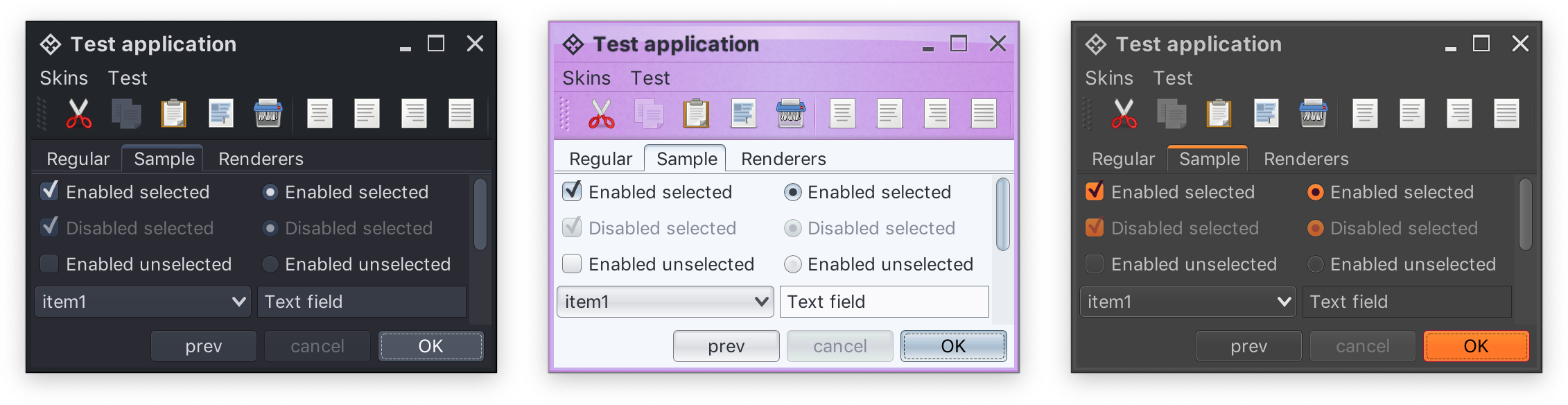
- 😻 New skins – Nebula Amethyst, Night Shade and Graphite Sunset
- 🤷♀️ Fix for disappearing internal frame title pane buttons
- 🤷♀️ Fix for crash during initialization
- 🤷♀️ Fix for
OutOfMemoryError on sliders with large model ranges
- 🤷♀️ Fix for slider tracks under dark skins
- 💔 Fix for incorrect tracking of state-based alpha values in color scheme bundles
- 🤷♀️ Fix for drop shadows under some skins
- 🤷♀️ Fix for contrast ratio of highlighted content under Sahara skin
- 🤷♀️ Fix for antialiased rendering of pasted text content
Flamingo
Trident
Photon
The first Radiance release focused on bringing all the different Swing open-source projects that I’ve been working on since 2005 under one roof. The second Radiance release was about making them work much better together. And this one (code-named Coral) is about covering major functionality gaps that were missing up until now.
There’s still a long road ahead to continue exploring the never-ending depths of what it takes to write elegant and high-performing desktop applications in Swing. If you’re in the business of writing just such apps, I’d love for you to take this third Radiance release for a spin. Click here to get the instructions on how to add Radiance to your Gradle / Maven / Ivy / Leiningen / Bazel builds. And don’t forget that all of the modules require Java 9 to build and run.
It gives me great pleasure to announce the second major release of Radiance. It was all ready to go as 2.0.0, but what’s a release really if a blocker bug doesn’t make it in? So instead, you get to get 2.0.1 for now – pending any other blockers that would require a couple more minor re-spins. Anyway, let’s get to what’s new. First, I’m going to use emojis to mark different parts of it like this:
💔 marks an incompatible API / binary change
😻 marks new features
🤷♀️ marks bug fixes and general improvements
General
- 💔 Java 9 is the new minimum requirement for build time and runtime of all Radiance modules
Modules
- 💔 Removed Spoonbill (SVNKit-powered implementation of Flamingo’s breadcrumb bar
- 😻 Added Meteor – Kotlin extensions for core Swing APIs
- 😻 Added Ember – Kotlin extensions for
SubstanceCortex APIs
- 🤷♀️ Renamed Kormorant to Plasma
- 🤷♀️ All core Kotlin modules (Ember, Meteor, Plasma) moved under the top-level
kotlin-ext folder
- 🤷♀️ Jitterbug (visual tool for editing Substance color schemes) renamed to Apollo
- 😻 Added Ion – sample walkthroughs for replacing
SwingWorker with Kotlin coroutines
Neon
- 💔 An almost complete rewrite of
NeonIcon APIs
- 💔 Most Flamingo and Substance APIs moved off of
ResizableIcon and to ResizableIcon.Factory
- 💔 Moved some icon colorization APIs from Substance to Neon
- 💔 Removed usage of
UITable from FontPolicy API
Photon
- 💔 Removed default public no-argument constructor from bundled templates for Java and Kotlin targets
Trident
- 💔 Moved to builder-based construction of timelines
Substance
- 😻 New
Graphite Electric skin
- 😻 New APIs for working with complex renderers, including built-in animations
- 🤷♀️ Fix for incorrect offsets of rotated texts
- 🤷♀️ Fix for inconsistent font metrics between preferred size and rendering passes
- 🤷♀️ Fix for incorrect vertical position of icons in
JOptionPane
- 🤷♀️ Fix for crash in showing
JColorChooser dialog
- 💔 Moved all three Office 2007 skins to the extras pack
Flamingo
- 💔 Moved all lower-level components (command button, command button strip. command popup menu, command button panel) to the new world based on content models, presentation models and projections
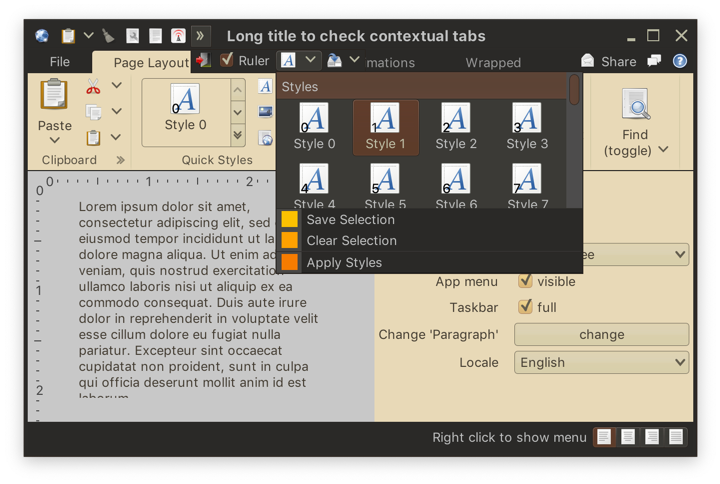
- 😻 Added support for placing any ribbon content (including components, application menu links and galleries) in the taskbar
- 😻 Added support for taskbar overflow (including built-in horizontal scrolling)
- 💔 Keytips for taskbar content are controlled by keytip policy
- 😻 Added support for separate keytips on action and secondary / popup areas of command buttons
- 😻 Added support for global contextual menu on the ribbon
- 🤷♀️ Added complete documentation
 The first Radiance release focused on bringing all the different Swing open-source projects that I’ve been working on since 2005 under one roof. This release (code-named Beryl) is about making them work much better together. And it’s also about making it just a bit easier to use Flamingo components in general, and the ribbon in particular, in what one might call serious, if not even boring, business applications.
There’s still a long road ahead to continue exploring the never-ending depths of what it takes to write elegant and high-performing desktop applications in Swing. If you’re in the business of writing just such apps, I’d love for you to take this second Radiance release for a spin. Click here to get the instructions on how to add Radiance to your Gradle / Maven / Ivy / Leiningen / Bazel builds. And don’t forget that all of the modules require Java 9 to build and run.
It’s been a few busy months since the announcement of Project Radiance, the new umbrella brand that unifies and streamlines the way Swing developers can integrate my libraries into their projects. Some of those projects have started all the way back in 2005, and some have joined later on along the road. Over the years, they’ve been hosted on three sites (java.net, kenai.com and github.com) in three version control systems (cvs, svn, git). Approaching the 15th year mark (with a hiatus along the way), it was clear that time has come to revisit the fundamental structure of these projects and bring them into a more modern world.
At a high-level:
- Radiance is a single project that provides a Gradle-based build that no longer relies on knowing exactly what to check out and where the dependent projects need to be located. It also uses proper third-party project dependencies to pull those at build time.
- Starting from the very first release, Radiance provides Maven artifacts for all core libraries – Trident (animation), Substance (look-and-feel), Flamingo (components), Photon (SVG icons) and others.
- The Kormorant sub-project is the first exploration into using Kotlin DSLs (domain-specific languages) for more declarative way of working with Swing UIs.
- Flamingo components only support Substance look-and-feel, no longer doing awkward and unnecessary tricks to try and support core and other third-party look-and-feels.
It gives me great pleasure to announce the very first release of Radiance, appropriately tagged 1.0.0 and code-named Antimony. Lines of code is about as meaningless a metric as it goes in our part of the world, but there are a lot of lines in Radiance. Ignoring the transcoded SVG files auto-generated by Photon, Radiance has around 208K lines of Java code, 7K lines of Kotlin code and 5K lines of build scripts.
It’s been a long road to get to where Radiance is today. And there’s a long road ahead to continue exploring the never-ending depths of what it takes to write elegant and high-performing desktop applications in Swing. If you’re in the business of writing just such apps, I’d love for you to take this very first Radiance release for a spin. You’ll find the prebuilt dependencies in the /drop/1.0.0 folder, and if you fancy a more proper dependency management mechanism, there’s an answer for that as well . All of them require Java 8 to build and run.
This week marks the beginning of a new phase for a bunch of my long-running open-source Swing projects. Some of them have started all the way back in 2005, and some have joined later on along the road. Over the years, they’ve been hosted on three sites (java.net, kenai.com and github.com) in three version control systems (cvs, svn, git). Approaching the 15th year mark (with a hiatus along the way), it’s clear that it’s time to revisit the fundamental structure of these projects and bring them into a more modern world.
Since these projects have been brought back to life in the last two years, the entire codebase has been revisited to clean up the cruft that has accumulated over time. Some of the explorations that I’ve embarked on have not went as well as I hoped they would be. That has been the fate of laf-plugin and laf-widget projects that aimed to bring common functionality across a variety of third-party look-and-feels, a field that is only seeing Substance and Synthetica as the two lone survivors.
Today I’m happy to announce the beginning of Project Radiance, the new umbrella brand that will unify and streamline the way Swing developers can integrate my libraries into their projects. At a high-level:
- Radiance is a single project that provides a Gradle-based build that no longer relies on knowing exactly what to check out and where the dependent projects need to be located. It also uses proper third-party project dependencies to pull those at build time.
- Starting from the very first release (planned for second half of 2018), Radiance will provide Maven artifacts for all core libraries – Trident (animation), Substance (look-and-feel), Flamingo (components), Ibis (SVG icons) and others.
- The Kormorant sub-project is the first exploration into using Kotlin DSLs (domain-specific languages) for more declarative way of working with Swing UIs.
- Flamingo components will only support Substance look-and-feel, no longer doing awkward and unnecessary tricks to try and support core and other third-party look-and-feels.
All the open bugs on existing GitHub projects have been migrated to be under Radiance. Once the migration of all the relevant documentation and older binaries to Radiance is complete in the next couple of weeks, those projects will be deleted from GitHub.
Starting from today, all new development such as bug fixes, feature work and documentation updates will only be done under Radiance. The versioning of all the projects will be unified going forward, resetting to 1.0. Some public APIs might move between sub-projects (going into Neon).
